Introduction
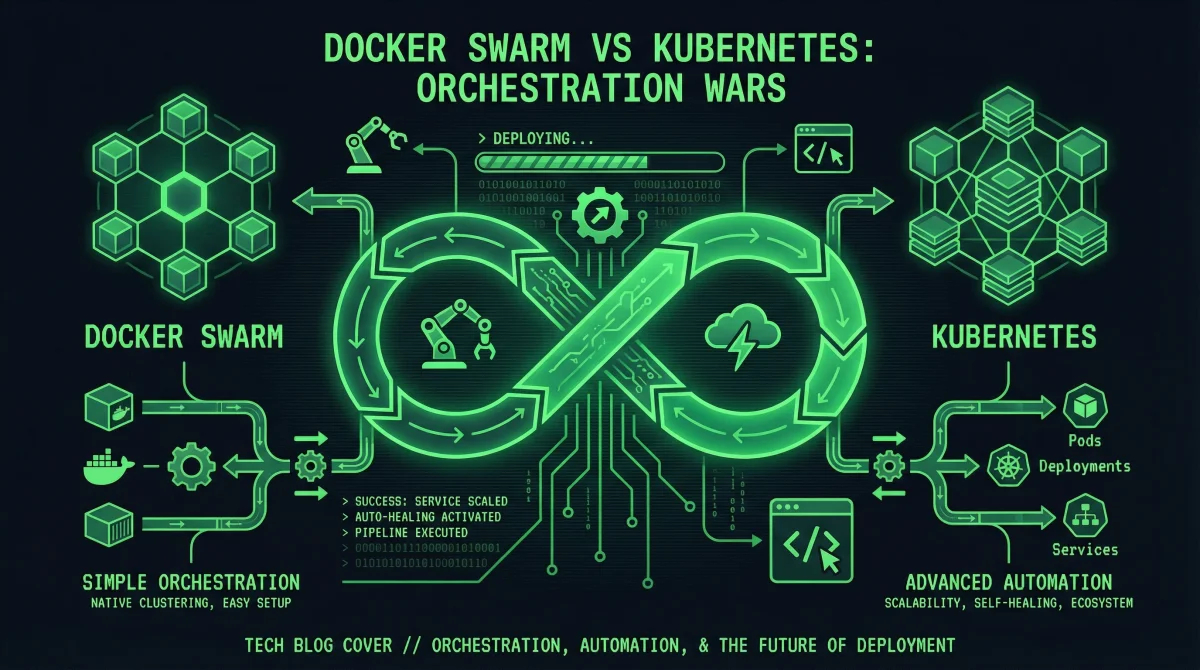
Container orchestration has become essential for deploying and managing applications at scale. As organizations adopt microservices architectures and container-based deployments, choosing the right orchestration platform significantly impacts operational complexity, resource efficiency, and team productivity. Docker Swarm and Kubernetes stand as the two most prominent open-source orchestration solutions, each offering distinct approaches to the same fundamental challenge.
Docker Swarm, developed by Docker Inc., emphasizes simplicity and ease of use. It integrates directly with the Docker ecosystem that many developers already know, requiring minimal additional learning to deploy production workloads. Kubernetes, originating from Google’s internal infrastructure and now maintained by the Cloud Native Computing Foundation, provides comprehensive automation capabilities with corresponding complexity. It has become the de facto standard for large-scale container deployments, supported by every major cloud provider.
This guide provides an in-depth comparison of Docker Swarm and Kubernetes across multiple dimensions. You will understand the architectural differences, deployment considerations, scaling behaviors, and ecosystem support that influence platform selection. Rather than declaring a universal winner, this analysis equips you to make an informed decision based on your specific requirements, team expertise, and operational context.
Understanding Container Orchestration
Before comparing specific platforms, understanding what container orchestration accomplishes helps frame the comparison meaningfully.
Container orchestration handles the lifecycle of containerized applications across clusters of servers. When you deploy an application using containers, orchestration platforms automatically manage container placement, health monitoring, scaling, networking, and updates. Without orchestration, administrators must manually track which containers run where, restart failed instances, distribute traffic across available servers, and coordinate rolling updates across fleets of servers.
Orchestration platforms abstract away server-level details, presenting a unified interface for deploying and managing applications. You describe your application’s requirements—how many instances, resource limits, network connections, and health checks—and the orchestration system handles the implementation details. This abstraction enables declarative infrastructure management, where you specify desired state and let the system converge toward that state automatically.
Docker Swarm Architecture
Docker Swarm transforms a pool of Docker hosts into a single, unified container deployment platform. Its architecture prioritizes simplicity while providing essential orchestration capabilities.
Swarm Mode Components
Docker Swarm operates in “swarm mode,” a built-in mode of the Docker Engine. Enabling swarm mode on a Docker host converts it into either a manager or worker node within the swarm cluster.
Manager nodes maintain the cluster state and handle scheduling decisions. A swarm requires at least one manager node, and production deployments typically run three or five managers for high availability. Manager nodes use the Raft consensus algorithm to agree on cluster state, which means they must communicate frequently and cannot be separated by significant network latency.
Worker nodes run containers assigned by manager nodes. They communicate with managers through the swarm overlay network, reporting container status and receiving execution instructions. Worker nodes do not participate in scheduling decisions or cluster state management, focusing purely on workload execution.
# Initialize a new swarm
docker swarm init --advertise-addr 192.168.1.100

# Add worker nodes (token displayed after init)
docker swarm join --token SWMTKN-xxxxx 192.168.1.100:2377

# Add a manager node (different token)
docker swarm join-token manager
docker swarm join --token SWMTKN-yyyyy 192.168.1.100:2377

# View swarm nodes
docker node ls
Services and Stacks
Docker Swarm introduces the concept of services, which represent a desired state for a particular workload. A service specifies which container image to run, how many replicas to maintain, networking configuration, and update policies.
# docker-compose.yml for swarm deployment
version: '3.8'

services:
  web:
    image: nginx:alpine
    deploy:
      replicas: 3
      endpoint_mode: vip
      update_config:
        parallelism: 1
        delay: 10s
      restart_policy:
        condition: on-failure
    ports:
      - "80:80"
    networks:
      - web-network

  redis:
    image: redis:alpine
    deploy:
      replicas: 1
    networks:
      - web-network

networks:
  web-network:
    driver: overlay
Stacks deploy multi-service applications using Docker Compose files with swarm-specific extensions. The stack concept enables deploying complex applications with a single command, managing all services, networks, and volumes together.
# Deploy a stack
docker stack deploy -c docker-compose.yml myapp

# View running stacks
docker stack ls

# View services in a stack
docker stack services myapp

# Remove a stack
docker stack rm myapp
Kubernetes Architecture
Kubernetes implements a more elaborate architecture designed for maximum flexibility and scalability. Understanding its components helps appreciate both its power and complexity.
Control Plane Components
The Kubernetes control plane consists of multiple components that collectively manage cluster state. These components typically run on dedicated master nodes, though small clusters can co-locate them with worker workloads.
The API server (kube-apiserver) provides the REST interface for all cluster operations. Every kubectl command, dashboard interaction, and programmatic client request flows through this component. The API server validates and processes requests, then persists state changes to etcd.
etcd serves as the distributed key-value store holding all cluster state. This single source of truth maintains configurations, pod assignments, network policies, and every other piece of information Kubernetes needs to manage the cluster. etcd requires careful backup and high availability configuration because cluster depends on its recovery data.
The scheduler (kube-scheduler) assigns newly created pods to nodes based on resource availability, constraints, and policies. It evaluates each pod’s requirements against node capacity and selects an appropriate placement.
The controller manager (kube-controller-manager) runs controller loops that continuously work toward desired state. These controllers handle node lifecycle, pod replication, service endpoints, and countless other reconciliation processes.
# Check control plane component status
kubectl get componentstatuses

# View API server endpoints
kubectl cluster-info

# Examine etcd health
kubectl get pods -n kube-system -l component=etcd
Node Architecture
Kubernetes worker nodes run two essential components: the kubelet and the container runtime. The kubelet communicates with the control plane, managing containers on its node according to specifications.
The container runtime handles actual container execution. Modern Kubernetes supports multiple runtimes including Docker, containerd, and CRI-O. The Container Runtime Interface (CRI) enables using different runtimes while maintaining consistent management through kubelet.
kube-proxy maintains network rules on each node, enabling service abstraction. It handles pod-to-pod communication, load balancing across pod replicas, and network policy enforcement.
# View node status and resources
kubectl get nodes -o wide

# Describe a specific node
kubectl describe node worker-node-1

# View node conditions
kubectl get nodes --show-labels
Pods, Deployments, and Services
Kubernetes organizes workloads into pods, the smallest deployable units. A pod typically contains one container but can include multiple tightly coupled containers sharing networking and storage.
# deployment.yaml
apiVersion: apps/v1
kind: Deployment
metadata:
  name: web-server
  labels:
    app: web-server
spec:
  replicas: 3
  selector:
    matchLabels:
      app: web-server
  template:
    metadata:
      labels:
        app: web-server
    spec:
      containers:
      - name: nginx
        image: nginx:alpine
        ports:
        - containerPort: 80
        resources:
          requests:
            memory: "64Mi"
            cpu: "100m"
          limits:
            memory: "128Mi"
            cpu: "200m"
---
apiVersion: v1
kind: Service
metadata:
  name: web-service
spec:
  selector:
    app: web-server
  ports:
    - protocol: TCP
      port: 80
      targetPort: 80
  type: ClusterIP
Deployment Complexity Comparison
The effort required to deploy and operate each platform varies dramatically. This difference often serves as the primary factor in platform selection.
Docker Swarm Deployment
Docker Swarm deployment requires minimal infrastructure. Any machine running Docker Engine can join a swarm with a single command. The entire cluster setup completes in minutes rather than hours.
# Initialize manager node (on first server)
docker swarm init --advertise-addr <MANAGER-IP>

# View swarm status
docker info | grep Swarm

# Worker nodes join with single command
docker swarm join --token <TOKEN> <MANAGER-IP>:2377
No additional components require installation, configuration, or maintenance. The Docker CLI manages all swarm operations, and existing Docker knowledge transfers directly to swarm management. This simplicity makes Swarm attractive for teams without dedicated platform operations staff.
Kubernetes Deployment
Kubernetes deployment involves significantly more components and configuration. While managed Kubernetes services from cloud providers reduce operational burden, self-managed installations require substantial expertise.
Managed services like Amazon EKS, Google GKE, and Azure AKS handle control plane management for you. You create clusters through cloud provider consoles or CLIs, then interact with them using kubectl:
# Create EKS cluster (AWS)
eksctl create cluster \
  --name my-cluster \
  --region us-west-2 \
  --nodegroup-name standard-workers \
  --node-type t3.medium \
  --nodes 3

# Create GKE cluster (GCP)
gcloud container clusters create my-cluster \
  --zone us-central1-a \
  --machine-type n1-standard-2 \
  --num-nodes 3

# Verify cluster access
kubectl get nodes
Self-managed Kubernetes using tools like kubeadm requires manual installation of each control plane component, configuration of high availability, and ongoing maintenance:
# Install kubeadm, kubelet, kubectl
sudo apt-get install -y kubeadm kubelet kubectl

# Initialize control plane
sudo kubeadm init --pod-network-cidr=10.244.0.0/16

# Install network plugin (Calico)
kubectl apply -f https://docs.projectcalico.org/manifests/calico.yaml

# Join worker nodes
kubeadm join <CONTROL-PLANE-IP>:6443 --token <TOKEN>
Feature Comparison
Both platforms provide container orchestration capabilities, but their feature sets and implementation approaches differ significantly.
Scheduling and Scaling
Docker Swarm uses a straightforward scheduling model based on spreading workloads across available nodes. It automatically distributes containers to minimize resource contention and maximize availability. Swarm supports both manual and automatic scaling through the Docker API or compose files.
# Scale service manually
docker service scale web=5

# View service status after scaling
docker service ls
docker service ps web
Kubernetes provides sophisticated scheduling with extensive customization options. Pod affinity rules, node selectors, resource quotas, and priority classes enable precise control over workload placement. Horizontal Pod Autoscaler automatically adjusts replica counts based on CPU utilization or custom metrics:
# Create Horizontal Pod Autoscaler
kubectl autoscale deployment web-server \
  --min=3 \
  --max=10 \
  --cpu-percent=70

# View autoscaler status
kubectl get hpa
Networking
Docker Swarm creates overlay networks that connect containers across all nodes in the swarm. Services receive virtual IP addresses (VIPs) that automatically load balance across all task instances. Swarm networking integrates with Docker’s existing network model, keeping the learning curve minimal.
# Create overlay network
docker network create \
  --driver overlay \
  --attachable \
  my-network

# Inspect service networking
docker service inspect web --format '{{json .Endpoint}}'
Kubernetes networking requires additional components for full functionality. The Container Network Interface (CNI) plugins handle pod networking, while services provide stable network endpoints. Ingress controllers manage external access with features like TLS termination and path-based routing:
# Ingress example
apiVersion: networking.k8s.io/v1
kind: Ingress
metadata:
  name: web-ingress
  annotations:
    nginx.ingress.kubernetes.io/rewrite-target: /
spec:
  ingressClassName: nginx
  rules:
  - host: app.example.com
    http:
      paths:
      - path: /
        pathType: Prefix
        backend:
          service:
            name: web-service
            port:
              number: 80
Storage Orchestration
Both platforms support persistent storage for stateful applications, but Kubernetes provides more extensive options through StorageClasses and PersistentVolumes.
Docker Swarm stores volumes locally on nodes where containers run. This local storage limits fault tolerance since volumes cannot migrate with containers. External storage solutions require additional configuration:
services:
  database:
    image: postgres:15
    volumes:
      - postgres_data:/var/lib/postgresql/data
    deploy:
      placement:
        constraints:
          - node.role == manager

volumes:
  postgres_data:
    driver: local
Kubernetes separates storage provisioning from pod scheduling through PersistentVolumeClaim resources. StorageClasses enable dynamic provisioning from various backends:
apiVersion: v1
kind: PersistentVolumeClaim
metadata:
  name: database-pvc
spec:
  accessModes:
    - ReadWriteOnce
  resources:
    requests:
      storage: 10Gi
  storageClassName: gp3
Health Monitoring
Docker Swarm monitors container health through its built-in health check integration. Containers report health status to Swarm managers, which restart unhealthy containers:
services:
  web:
    image: nginx:alpine
    healthcheck:
      test: ["CMD", "wget", "-q", "--spider", "http://localhost/"]
      interval: 30s
      timeout: 10s
      retries: 3
      start_period: 5s
Kubernetes implements more sophisticated health checking with liveness and readiness probes. Liveness probes determine whether a container should restart, while readiness probes control whether a pod receives traffic:
spec:
  containers:
  - name: web
    image: nginx:alpine
    livenessProbe:
      httpGet:
        path: /healthz
        port: 80
      initialDelaySeconds: 15
      periodSeconds: 20
    readinessProbe:
      httpGet:
        path: /ready
        port: 80
      initialDelaySeconds: 5
      periodSeconds: 10
Ecosystem and Community
The ecosystems surrounding each platform influence long-term viability, tooling availability, and problem-solving resources.
Kubernetes Ecosystem
Kubernetes has achieved near-universal adoption in cloud-native environments. The CNCF (Cloud Native Computing Foundation) oversees numerous projects that integrate with Kubernetes, including service meshes (Istio, Linkerd), monitoring (Prometheus, Grafana), logging (Fluentd, Loki), and security (OPA, Falco).
Cloud providers offer managed Kubernetes services with additional integrations: AWS ALB Ingress Controller, Google Cloud Operations suite, and Azure Policy all extend Kubernetes functionality. This ecosystem provides solutions for virtually every operational requirement.
# Install Prometheus Operator via Helm
helm repo add prometheus-community https://prometheus-community.github.io/helm-charts
helm install prometheus prometheus-community/kube-prometheus-stack
The Kubernetes community produces extensive documentation, tutorials, and certification programs. The Certified Kubernetes Administrator (CKA) and Certified Kubernetes Application Developer (CKAD) certifications validate expertise that employers recognize globally.
Docker Swarm Ecosystem
Docker Swarm integrates with the broader Docker ecosystem, which remains substantial despite Kubernetes’s rise. Docker Desktop provides familiar tooling for developers, and Docker Compose files often serve as deployment manifests for Swarm clusters.
The ecosystem around Swarm is smaller but still functional. Monitoring tools like Portainer provide visual Swarm management, and logging drivers integrate with common aggregation systems. However, the pace of new feature development for Swarm has slowed compared to Kubernetes.
Performance and Scalability
Both platforms handle production workloads, but their scalability characteristics differ based on design philosophy and implementation.
Docker Swarm Performance
Docker Swarm excels in scenarios requiring moderate scale with minimal overhead. The lightweight architecture means efficient resource utilization and quick scaling operations. Swarm reliably manages clusters of hundreds of nodes with thousands of containers.
# Benchmark Swarm scheduling
docker service create \
  --name benchmark \
  --replicas 100 \
  alpine:latest \
  sleep infinity
Swarm’s simplicity translates to predictable performance characteristics. The Raft consensus among managers introduces some latency for cluster-wide operations, but this remains negligible for most workloads.
Kubernetes Scalability
Kubernetes deployments at scale demonstrate the platform’s ability to manage thousands of nodes and hundreds of thousands of pods. Major organizations run production Kubernetes clusters with substantial scale, validated through the CNCF’s Certified Kubernetes Conformance Program.
Scaling operations in Kubernetes involve more components but remain automated through controllers and autoscalers. The additional complexity enables more sophisticated scaling policies and better resource utilization at extreme scale.
Choosing the Right Platform
Selecting between Swarm and Kubernetes requires honest assessment of your organization’s needs, capabilities, and constraints.
Choose Docker Swarm When:
Your team prioritizes simplicity and speed of deployment. Swarm works excellently for small to medium deployments, development environments, and organizations without dedicated platform operations staff. If your workloads fit well within Docker Compose and you need production orchestration without extensive training investments, Swarm provides a pragmatic choice.
Swarm suits teams transitioning from simple container deployments to orchestrated environments. The familiar Docker CLI and incremental learning curve reduce friction during adoption. Organizations using Docker extensively in development workflows find Swarm’s consistency valuable.
Choose Kubernetes When:
You need enterprise-grade orchestration with extensive customization. Kubernetes provides granular control over every aspect of container deployment, making it suitable for complex requirements that exceed Swarm’s capabilities. Organizations expecting significant scale or multi-team platform usage benefit from Kubernetes’s mature abstractions.
Your organization requires cloud provider integration or plans multi-cloud deployments. Kubernetes’ standardization across providers eliminates vendor lock-in and enables workload portability. Teams building platform abstractions for other development teams need Kubernetes’s rich API and extension mechanisms.
Hybrid Approaches
Some organizations use both platforms for different workloads. Development environments might run Swarm for simplicity while production uses Kubernetes for scale and features. This approach lets teams leverage each platform’s strengths while managing complexity incrementally.
Related Guides: