Introduction
Continuous Integration and Continuous Deployment (CI/CD) transforms how teams deliver software. Automated pipelines catch bugs early, ensure consistent deployments, and reduce manual effort. This guide walks through building a production-ready CI/CD pipeline using GitHub Actions, Docker, and modern deployment practices.
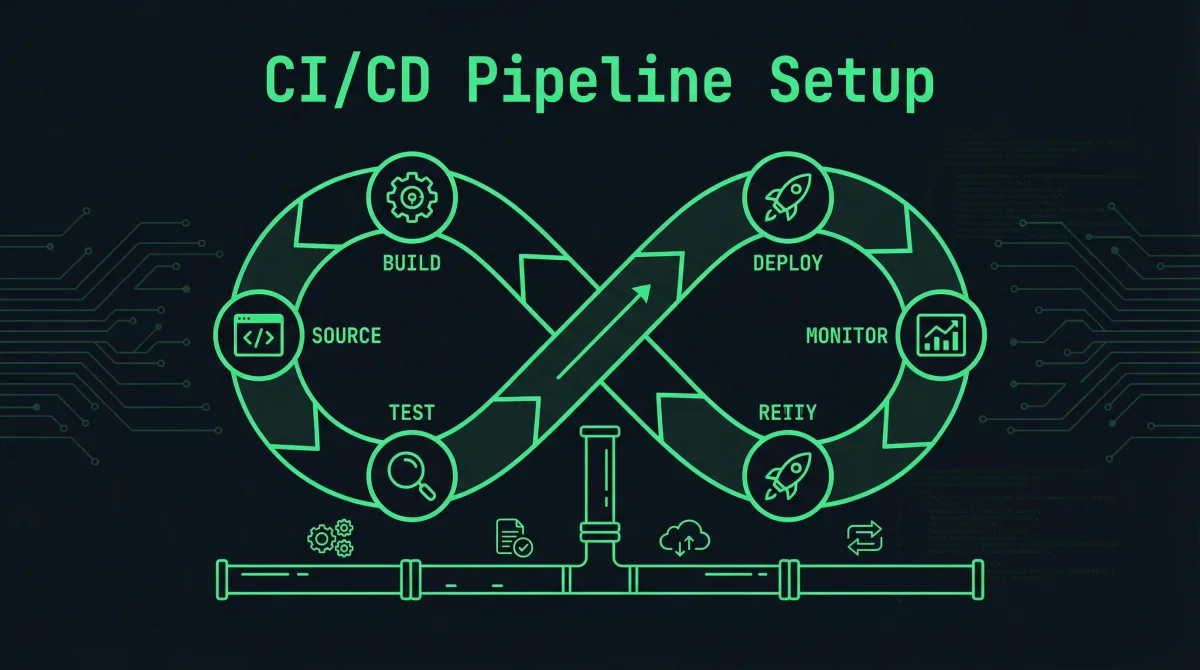
The pipeline we build covers code checkout, dependency installation, testing, building container images, and deploying to production. Each stage provides feedback that helps developers identify and fix problems quickly. The automation eliminates inconsistencies that plague manual deployment processes.
CI/CD principles apply to projects ranging from personal applications to enterprise systems, improving software quality regardless of team size. The practices here prepare you for DevOps roles and modern development workflows.
Pipeline Architecture
Before writing configuration files, design your pipeline architecture to structure the implementation effectively. A well-designed pipeline balances thoroughness with speed, providing comprehensive checks without creating excessive friction.
Pipeline Stages
Most pipelines include several standard stages. Code checkout retrieves the latest code from version control. Dependency installation ensures all required packages are available. The build stage compiles code and creates artifacts. Testing stages run unit tests, integration tests, and security scans. Image building creates container images for deployment. Deployment stages push changes to target environments.
The pipeline should fail fast when possible. Place quick checks like linting and unit tests early in the process. Expensive tests like integration tests and security scans run after basic validation passes. This approach minimizes feedback time for common issues.
Environment Considerations
Separate environments prevent accidental production changes and enable testing in production-like settings. A common pattern includes development, staging, and production environments. Code flows through these environments progressively, with automated or manual approvals between stages.
Environment-specific configuration allows the same pipeline to deploy to different targets. Variables and secrets configure each environment without modifying pipeline code. This separation enables testing against staging configurations that mirror production.
GitHub Actions Workflows
GitHub Actions provides integrated CI/CD capabilities for repositories hosted on GitHub. Workflows defined in YAML files describe pipeline stages and their relationships.
Basic Workflow Structure
Create a workflow file in your repository:
# .github/workflows/ci.yml
name: CI Pipeline

on:
  push:
    branches: [main, develop]
  pull_request:
    branches: [main]

env:
  REGISTRY: ghcr.io
  IMAGE_NAME: ${{ github.repository }}

jobs:
  test:
    runs-on: ubuntu-latest

    steps:
    - name: Checkout code
      uses: actions/checkout@v4

    - name:      uses: actions/setup-python@v5 Set up Python

      with:
        python-version: '3.11'
        cache: 'pip'

    - name: Install dependencies
      run: |
        python -m pip install --upgrade pip
        pip install -r requirements.txt

    - name: Run linter
      run: |
        pip install ruff
        ruff check .

    - name: Run unit tests
      run: |
        pip install pytest pytest-cov
        pytest --cov=./ --cov-report=xml

    - name: Upload coverage report
      uses: codecov/codecov-action@v3
      with:
        files: ./coverage.xml
This workflow triggers on pushes to main and develop branches, as well as pull requests targeting main. It runs linting and tests, uploading coverage data for tracking.
Building Container Images
Docker image building creates deployable artifacts from your code:
# Continue from previous workflow...

  build:
    needs: test
    runs-on: ubuntu-latest
    if: github.ref == 'refs/heads/main'

    steps:
    - name: Checkout code
      uses: actions/checkout@v4

    - name: Set up Docker Buildx
      uses: docker/setup-buildx-action@v3

    - name: Log in to container registry
      uses: docker/login-action@v3
      with:
        registry: ghcr.io
        username: ${{ github.actor }}
        password: ${{ secrets.GITHUB_TOKEN }}

    - name: Extract metadata for Docker
      id: meta
      uses: docker/metadata-action@v5
      with:
        images: ghcr.io/${{ github.repository }}
        tags: |
          type=sha
          type=ref,event=branch
          type=raw,value=latest,enable={{is_default_branch}}

    - name: Build and push Docker image
      uses: docker/build-push-action@v5
      with:
        context: .
        push: true
        tags: ${{ steps.meta.outputs.tags }}
        labels: ${{ steps.meta.outputs.labels }}
        cache-from: type=gha
        cache-to: type=gha,mode=max
The build job runs only after tests pass (defined by needs: test). It uses GitHub’s container registry for storing images. Build caching speeds up subsequent builds by reusing layers from previous builds.
Deployment Workflow
Create a separate workflow for deployment to keep configuration organized:
# .github/workflows/deploy.yml
name: Deploy to Production

on:
  workflow_run:
    workflows: ["CI Pipeline"]
    types: [completed]
    branches: [main]

jobs:
  deploy:
    runs-on: ubuntu-latest
    if: ${{ github.event.workflow_run.conclusion == 'success' }}

    steps:
    - name: Checkout code
      uses: actions/checkout@v4

    - name: Deploy to server
      uses: appleboy/ssh-action@v1
      with:
        host: ${{ secrets.SERVER_HOST }}
        username: ${{ secrets.SERVER_USER }}
        key: ${{ secrets.SERVER_SSH_KEY }}
        script: |
          cd /opt/myapp
          docker pull ghcr.io/${{ github.repository }}:${{ github.sha }}
          docker-compose down
          docker-compose up -d
          docker image prune -f
This deployment workflow triggers automatically when the CI pipeline completes successfully. It connects to your server via SSH and performs the deployment using Docker Compose.
Testing Strategies
Comprehensive testing ensures your pipeline catches issues before they reach production. Different test types serve different purposes and have different tradeoffs.
Unit Testing
Unit tests verify individual components in isolation. They run quickly and help identify bugs during development. Configure your pipeline to run unit tests on every commit:
- name: Run unit tests
  run: pytest tests/unit/ -v --junitxml=report.xml
Store test results in JUnit format for GitHub’s test visualization:
- name: Publish test results
  uses: dorny/test-reporter@v1
  if: always()
  with:
    name: Unit Tests
    path: report.xml
    reporter: java-junit
Integration Testing
Integration tests verify components working together. They require more setup but catch issues unit tests miss. Run integration tests in an environment that mirrors production:
- name: Run integration tests
  run: |
    docker-compose -f docker-compose.test.yml up -d
    sleep 10
    pytest tests/integration/ -v
    docker-compose -f docker-compose.test.yml down
The integration tests use a separate Docker Compose configuration that includes test versions of dependencies like databases and message queues.
Security Scanning
Automated security scanning catches vulnerabilities before deployment. Include these scans in your pipeline:
- name: Run Trivy vulnerability scanner
  uses: aquasecurity/trivy-action@master
  with:
    scan-type: 'fs'
    scan-ref: '.'
    format: 'sarif'
    output: 'trivy-results.sarif'

  - name: Upload Trivy scan results
    uses: github/codeql-action/upload-sarif@v2
    if: always()
    with:
      sarif_file: 'trivy-results.sarif'
Trivy scans your codebase and dependencies for known vulnerabilities. Results upload to GitHub’s security tab, providing visibility into your security posture.
Deployment Strategies
Different deployment strategies suit different risk tolerances and requirements. Choose the strategy that matches your project’s needs.
Basic Deployment
The simplest approach stops existing containers and starts new ones. This causes brief downtime but works reliably:
# Simple deployment script
docker-compose down
docker-compose pull
docker-compose up -d
This approach suits applications that tolerate brief outages. Consider database migrations that might require downtime windows.
Blue-Green Deployment
Blue-green deployment maintains two complete environments and switches traffic between them. This approach enables instant cutover and easy rollback:
#!/bin/bash
# deploy-blue-green.sh

# Pull new version to green environment
export VERSION=green
docker-compose -f docker-compose.green.yml up -d

# Run smoke tests
if curl -sf http://green.health-check > /dev/null; then
    # Switch traffic (using your load balancer or reverse proxy)
    ./switch-traffic-to green

    # Decommission old environment
    docker-compose -f docker-compose.blue.yml down
else
    echo "Green environment failed health check"
    docker-compose -f docker-compose.green.yml down
    exit 1
fi
Rolling Deployment
Kubernetes and container orchestration platforms support rolling updates that gradually replace instances:
# Kubernetes rolling update
kubectl set image deployment/myapp myapp=myregistry/myapp:$NEW_VERSION
Kubernetes ensures the specified number of replicas remain available throughout the update, providing zero-downtime deployments automatically.
Pipeline Best Practices
Following best practices improves pipeline reliability and maintainability.
Caching Dependencies
Dependency installation often takes significant time. Cache dependencies to speed up pipeline runs:
- name: Cache pip packages
  uses: actions/cache@v4
  with:
    path: ~/.cache/pip
    key: ${{ runner.os }}-pip-${{ hashFiles('**/requirements*.txt') }}
    restore-keys: |
      ${{ runner.os }}-pip-
Match cache keys to your dependency files. The restore keys provide partial matches when exact caches are unavailable.
Parallel Execution
Independent jobs run in parallel, reducing total pipeline duration:
jobs:
  lint:
    runs-on: ubuntu-latest
    steps:
      - run: npm run lint

  test:
    runs-on: ubuntu-latest
    steps:
      - run: npm test

  build:
    needs: [lint, test]
    runs-on: ubuntu-latest
    steps:
      - run: npm build
The lint and test jobs run simultaneously. The build job waits for both to complete before starting.
Notification and Alerts
Configure notifications for pipeline events:
- name: Send Slack notification
  if: always()
  uses: 8398a7/action-slack@v3
  with:
    status: ${{ job.status }}
    channel: '#deployments'
    text: 'Pipeline completed'
  env:
    SLACK_WEBHOOK_URL: ${{ secrets.SLACK_WEBHOOK_URL }}
Integrate with Slack, Discord, or other communication tools to keep your team informed of deployment status.
Conclusion
A well-designed CI/CD pipeline improves software quality and deployment reliability. The patterns in this guide provide foundations that scale with your projects.
Continue exploring pipeline capabilities as your requirements grow. Advanced features like environment promotions, canary deployments, and performance testing add additional value. The investment in automation pays dividends through reduced manual effort and improved consistency.
Related Posts: