Introduction
Container deployment strategies determine how new versions reach production users. The strategy you choose affects deployment risk, rollback speed, and operational complexity. This guide covers practical deployment patterns that balance reliability with velocity.
Modern deployment strategies enable progressive rollouts that reveal problems before they affect all users. Rather than deploying a new version to everyone simultaneously, you can route a small percentage of traffic to new versions, monitor for issues, and gradually increase exposure.
These patterns apply whether you use Docker Compose, Kubernetes, or dedicated deployment platforms. The techniques here suit production operations that demand high availability.
Deployment Strategy Overview
Different strategies suit different risk tolerances and infrastructure capabilities. Choose the strategy that matches your requirements and constraints.
Strategy Comparison
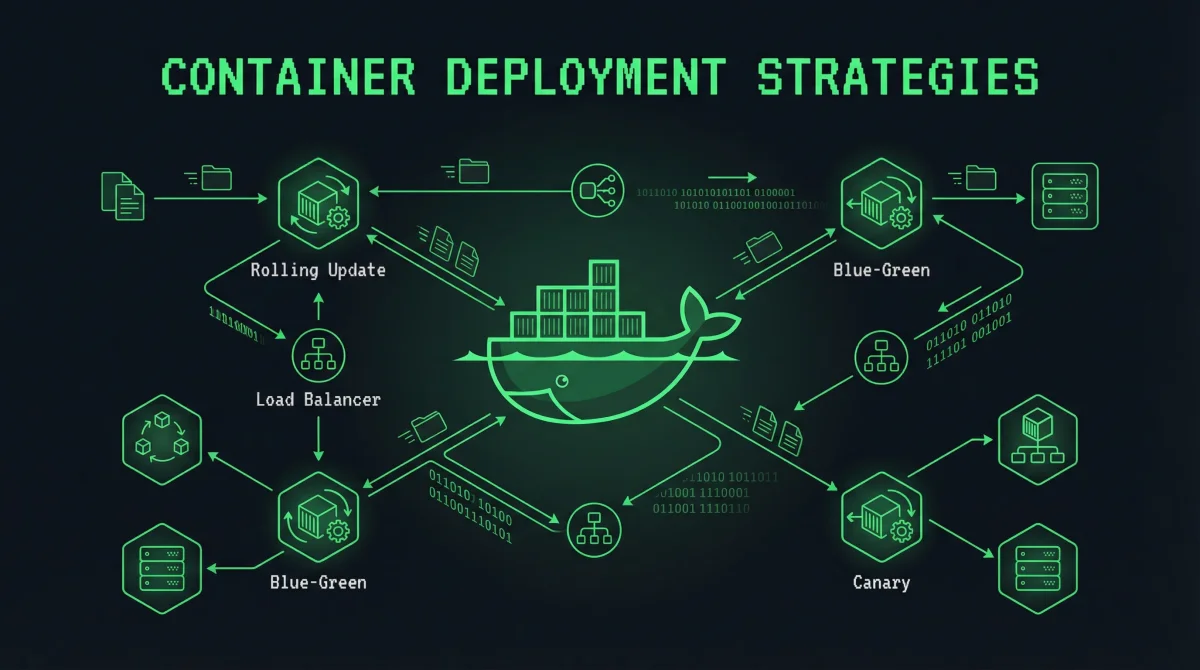
Rolling updates replace instances gradually, maintaining capacity throughout deployment. This approach works well for stateless applications with multiple replicas and requires minimal infrastructure beyond basic container orchestration.
Blue-green deployment maintains two complete environments and switches traffic instantly. This pattern provides instant rollback capability and simplifies testing, but requires double the resources during deployment.
Canary deployment routes a small percentage of traffic to new versions, expanding gradually if metrics remain healthy. This approach provides early warning of problems while limiting blast radius. It requires traffic management capabilities and comprehensive monitoring.
A/B testing and feature flags enable more complex experiments beyond version comparisons. These patterns suit organizations testing new features with specific user segments rather than infrastructure changes.
Rolling Updates
Rolling updates replace instances gradually, ensuring service continuity throughout the deployment.
Docker Compose Rolling Updates
Configure rolling updates in Docker Compose for automatic gradual deployment:
version: '3.8'

services:
  web:
    image: myregistry/myapp:v2.0.0
    deploy:
      update_config:
        parallelism: 2
        delay: 10s
        order: start-first
      restart_policy:
        condition: on-failure
    networks:
      - frontend

  nginx:
    image: nginx:alpine
    depends_on:
      - web
    networks:
      - frontend
The update_config settings control deployment behavior. parallelism specifies how many containers update simultaneously. delay waits between update batches. order: start-first ensures new containers start before old ones stop.
Execute rolling updates through Docker Stack deployment:
# Deploy with rolling updates
docker stack deploy -c docker-compose.yml myapp

# Manually trigger rolling update
docker service update --update-parallelism 2 myapp_web
Docker Swarm manages rolling updates automatically when you update service images.
Manual Rolling Updates
For basic Docker deployments, implement rolling updates manually:
#!/bin/bash
# rolling-update.sh

OLD_VERSION=$(docker ps -q --filter "ancestry=myapp:v1.9.0")
NEW_VERSION="myapp:v2.0.0"
BATCH_SIZE=2
HEALTH_URL="http://localhost:8080/health"

# Pull latest image
docker pull myregistry/$NEW_VERSION

# Get current replica count
TOTAL=$(docker ps -q --filter "ancestry=myapp:v1.9.0" | wc -l)

# Update in batches
for i in $(seq 0 $BATCH_SIZE $TOTAL); do
    # Get container IDs for this batch
    CONTAINERS=$(docker ps -q --filter "ancestry=myapp:v1.9.0" | head -$BATCH_SIZE)

    for CONTAINER in $CONTAINERS; do
        echo "Updating $CONTAINER..."

        # Start new container
        docker run -d --name ${CONTAINER}_new myregistry/$NEW_VERSION

        # Wait for health check
        for attempt in {1..30}; do
            if curl -sf $HEALTH_URL > /dev/null; then
                break
            fi
            sleep 1
        done

        # Stop old container
        docker stop $CONTAINER
        docker rm $CONTAINER
        docker rename ${CONTAINER}_new $CONTAINER
    done

    echo "Batch complete, waiting 10 seconds..."
    sleep 10
done
This script demonstrates the rolling update logic. Production implementations should include more robust health checking, error handling, and rollback logic.
Blue-Green Deployment
Blue-green deployment maintains two complete environments and switches traffic between them.
Infrastructure Setup
Configure your infrastructure for blue-green deployment:
version: '3.8'

services:
  blue:
    image: myapp:blue
    networks:
      - blue-network
    environment:
      - ENVIRONMENT=blue

  green:
    image: myapp:green
    networks:
      - green-network
    environment:
      - ENVIRONMENT=green
    deploy:
      replicas: 0

  nginx:
    image: nginx:alpine
    networks:
      - blue-network
      - green-network
    volumes:
      - ./nginx.conf:/etc/nginx/nginx.conf:ro
Both environments run simultaneously, with only one receiving traffic. The inactive environment stays ready for immediate activation.
Nginx Traffic Switching
Configure Nginx to switch between environments:
upstream blue_backend {
    server blue:80;
    keepalive 32;
}

upstream green_backend {
    server green:80;
    keepalive 32;
}

server {
    listen 80;

    # Control which backend receives traffic
    set $target_backend blue;

    location / {
        proxy_pass http://$target_backend;
        proxy_http_version 1.1;
        proxy_set_header Host $host;
        proxy_set_header X-Real-IP $remote_addr;
        proxy_set_header X-Forwarded-For $proxy_add_x_forwarded_for;

        # Health check endpoints
        health_check;
    }
}
Switch traffic by changing the Nginx configuration and reloading:
#!/bin/bash
# switch-to-green.sh

# Deploy new version to green
docker-compose -f docker-compose.blue-green.yml up -d green

# Wait for green to pass health checks
sleep 30

# Switch traffic
sed -i 's/set $target_backend blue;/set $target_backend green;/' nginx.conf
nginx -t && nginx -s reload

# Monitor for issues
echo "Monitoring for 5 minutes..."
sleep 300

# If issues detected, rollback
if [ "$ISSUES_DETECTED" == "true" ]; then
    sed -i 's/set $target_backend green;/set $target_backend blue;/' nginx.conf
    nginx -t && nginx -s reload
    echo "Rolled back to blue"
else
    echo "Green deployment successful"
    docker-compose -f docker-compose.blue-green.yml down blue
fi
DNS-Based Blue-Green
For DNS-based switching, update DNS records to point to different IPs:
#!/bin/bash
# dns-switch.sh

# Get current blue IP
BLUE_IP=$(docker inspect -f '{{range .NetworkSettings.Networks}}{{.IPAddress}}{{end}}' blue-green_blue_1)

# Update DNS (using Cloudflare API example)
curl -X PUT "https://api.cloudflare.com/client/v4/zones/$ZONE_ID/dns_records/$RECORD_ID" \
  -H "Authorization: Bearer $API_TOKEN" \
  -H "Content-Type: application/json" \
  --data '{"type":"A","name":"myapp.example.com","content":"'"$GREEN_IP"'"}'

# Wait for DNS propagation
sleep 60

# Verify deployment before finalizing
read -p "Verify deployment - press Enter to confirm or 'r' to rollback: " confirm

if [ "$confirm" == "r" ]; then
    # Rollback by restoring old IP
    curl -X PUT "https://api.cloudflare.com/client/v4/zones/$ZONE_ID/dns_records/$RECORD_ID" \
      -H "Authorization: Bearer $API_TOKEN" \
      -H "Content-Type: application/json" \
      --data '{"type":"A","name":"myapp.example.com","content":"'"$BLUE_IP"'"}'
fi
DNS switching provides simple rollback but requires propagation time.
Canary Deployment
Canary deployment routes a small percentage of traffic to new versions, expanding gradually based on metrics.
Traffic Splitting with Nginx
Configure Nginx for weighted traffic distribution:
upstream backend {
    server myapp-v1:80 weight=90;
    server myapp-v2:00 weight=10;

    # Or with consistent hashing
    # hash $request_uri consistent;
}

server {
    listen 80;

    location / {
        proxy_pass http://backend;
        proxy_http_version 1.1;
        proxy_set_header Host $host;
        proxy_set_header X-Real-IP $remote_addr;
    }
}
Change weights to increase canary exposure:
# Update configuration for 50/50 split
sed -i 's/server myapp-v2:00 weight=10;/server myapp-v2:00 weight=50;/' nginx.conf
nginx -t && nginx -s reload

# Continue increasing
sed -i 's/server myapp-v2:00 weight=50;/server myapp-v2:00 weight=100;/' nginx.conf
nginx -t && nginx -s reload
Kubernetes Canary Deployments
Kubernetes supports canary deployments through multiple mechanisms:
# canary.yaml
apiVersion: networking.k8s.io/v1
kind: Ingress
metadata:
  name: myapp-canary
  annotations:
    nginx.ingress.kubernetes.io/canary: "true"
    nginx.ingress.kubernetes.io/canary-weight: "10"
spec:
  ingressClassName: nginx
  rules:
  - host: myapp.example.com
    http:
      paths:
      - path: /
        pathType: Prefix
        backend:
          service:
            name: myapp-canary
            port:
              number: 80
The annotation-based approach requires minimal configuration. Adjust canary-weight to change traffic distribution.
Automated Canary Analysis
Implement automated canary analysis that expands traffic based on metrics:
#!/bin/bash
# canary-deploy.sh

NEW_VERSION="myapp:v2.0.0"
CANARY_WEIGHT=10
STABLE_SERVICE="myapp-stable"
CANARY_SERVICE="myapp-canary"

# Deploy canary
kubectl create deployment $CANARY_SERVICE --image=myregistry/$NEW_VERSION
kubectl expose deployment $CANARY_SERVICE --port=80 --type=ClusterIP

# Configure ingress for canary weight
kubectl annotate ingress myapp-ingress \
  nginx.ingress.kubernetes.io/canary="true" \
  nginx.ingress.kubernetes.io/canary-weight="$CANARY_WEIGHT"

# Monitor metrics for 5 minutes
sleep 300

# Check error rates
ERROR_RATE=$(curl -sf http://myapp-canary/metrics 2>/dev/null | grep 'error_total' | awk '{print $2}')

if [ "$ERROR_RATE" -lt 100 ]; then
    echo "Canary healthy, increasing to 50%"
    kubectl annotate ingress myapp-ingress \
      nginx.ingress.kubernetes.io/canary-weight="50"
    sleep 300

    ERROR_RATE=$(curl -sf http://myapp-canary/metrics | grep 'error_total' | awk '{print $2}')

    if [ "$ERROR_RATE" -lt 100 ]; then
        echo "Promoting canary to 100%"
        kubectl set image deployment/$STABLE_SERVICE *=myregistry/$NEW_VERSION
        kubectl delete deployment $CANARY_SERVICE
    else
        echo "Error rates elevated, rolling back canary"
        kubectl annotate ingress myapp-ingress \
          nginx.ingress.kubernetes.io/canary-weight="0"
        kubectl delete deployment $CANARY_SERVICE
    fi
else
    echo "Error rates too high, removing canary"
    kubectl annotate ingress myapp-ingress \
      nginx.ingress.kubernetes.io/canary-weight="0"
    kubectl delete deployment $CANARY_SERVICE
fi
Production implementations should integrate with monitoring systems like Prometheus for metric collection and alerting.
Rollback Strategies
Every deployment should have a clear rollback path. Plan rollbacks before deployments begin.
Docker Rollback
Implement rollback for Docker deployments:
#!/bin/bash
# rollback.sh

CURRENT_IMAGE=$(docker ps --format '{{.Image}}' | head -1)

# Identify previous image from image history
PREVIOUS_IMAGE=$(docker history $CURRENT_IMAGE 2>/dev/null | \
  grep -v 'missing' | \
  grep -v 'IMAGE' | \
  awk 'NR==2 {print $1}')

if [ -z "$PREVIOUS_IMAGE" ]; then
    echo "Cannot determine previous image"
    exit 1
fi

# Pull previous image if needed
docker pull $PREVIOUS_IMAGE

# Stop current containers
docker-compose down

# Start with previous image
IMAGE=$PREVIOUS_IMAGE docker-compose up -d

echo "Rolled back to $PREVIOUS_IMAGE"
Kubernetes Rollback
Kubernetes maintains revision history for easy rollback:
# View deployment history
kubectl rollout history deployment/myapp

# Rollback to previous version
kubectl rollout undo deployment/myapp

# Rollback to specific revision
kubectl rollout undo deployment/myapp --to-revision=3

# Monitor rollback progress
kubectl rollout status deployment/myapp
Database Rollback
Database rollback requires special consideration because schema changes may not be reversible:
#!/bin/bash
# database-rollback.sh

# Create rollback script before migration
echo "CREATE TABLE backup_$(date +%Y%m%d_%H%M%S) AS SELECT * FROM users;" > /tmp/rollback_users.sql

# Run rollback if deployment fails
if [ "$DEPLOYMENT_FAILED" == "true" ]; then
    echo "Rolling back database changes..."
    psql -U postgres -d myapp -f /tmp/rollback_users.sql
fi
Monitoring During Deployment
Effective monitoring provides early warning of problems during deployment.
Key Metrics
Monitor these metrics during deployments:
# Prometheus query examples

# Error rate increase
rate(http_errors_total[5m])

# Latency p99
histogram_quantile(0.99, rate(http_request_duration_seconds_bucket[5m]))

# Success rate
rate(http_requests_total{status=~"2.."}[5m]) / rate(http_requests_total[5m])

# Resource usage
container_memory_working_set_bytes{container="myapp"}
container_cpu_usage_seconds_total{container="myapp"}
Configure alerts for metric thresholds during deployment:
alert: DeploymentErrorRate
expr: rate(http_errors_total[5m]) > 0.01
for: 2m
labels:
  severity: critical
annotations:
  summary: "Error rate elevated during deployment"
Health Check Endpoints
Implement comprehensive health checks:
# health.py
import os
from flask import Flask

app = Flask(__name__)

@app.route('/health')
def health():
    checks = {}

    # Database connectivity
    try:
        db.execute('SELECT 1')
        checks['database'] = 'healthy'
    except Exception as e:
        checks['database'] = f'unhealthy: {e}'

    # Redis connectivity
    try:
        redis.ping()
        checks['redis'] = 'healthy'
    except Exception as e:
        checks['redis'] = f'unhealthy: {e}'

    # Overall status
    status = 200 if all(v == 'healthy' for v in checks.values()) else 503
    return checks, status

@app.route('/ready')
def ready():
    # More aggressive readiness check
    return 'ready', 200
Health checks determine whether containers receive traffic. Readiness checks control when pods enter service. Liveness checks detect hung processes requiring restart.
Conclusion
Container deployment strategies enable safer, more controlled releases. The pattern you choose depends on your infrastructure, risk tolerance, and team capabilities.
Rolling updates suit most applications with sufficient replicas. Blue-green deployment provides instant rollback for critical systems. Canary deployment balances risk reduction with continuous delivery. Combine strategies for complex deployments that require multiple validation stages.
Always test rollback procedures before production deployments. Document deployment and rollback steps. Practice deployments in staging environments that mirror production. Preparation prevents incidents during actual deployments.
Related Posts: