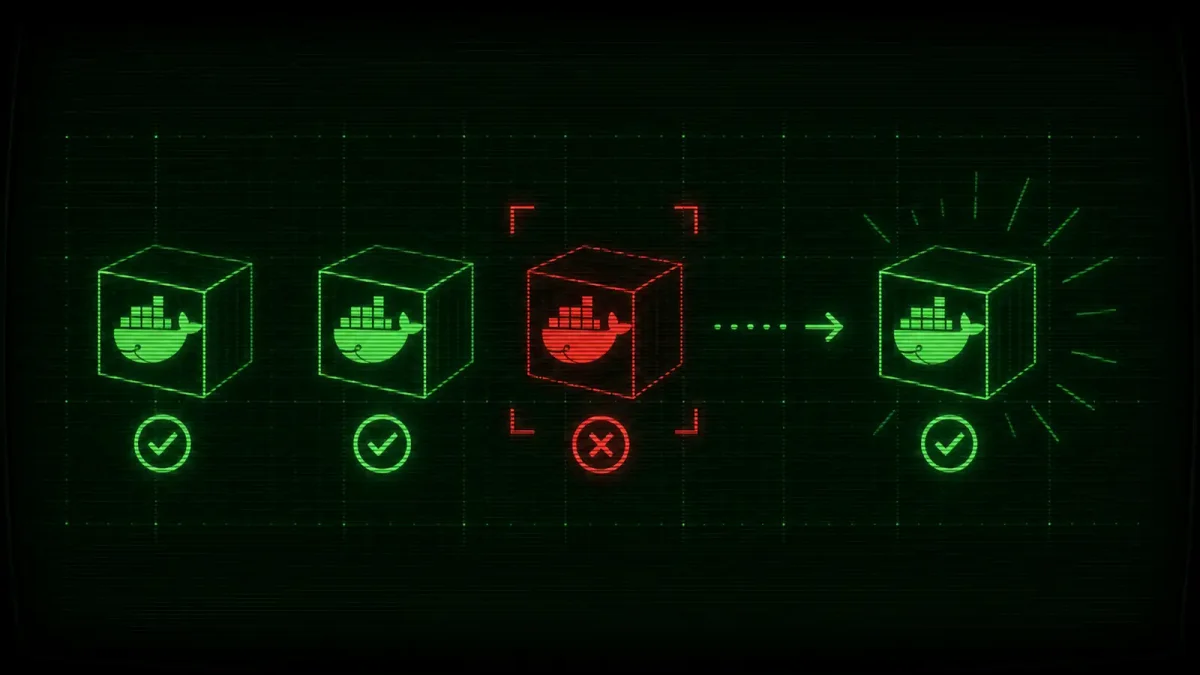
A container that is running is not the same thing as a container that is working. Docker knows when a process crashes and exits. It does not know — unless you tell it — when your web server is accepting connections but returning 500 errors, or when your database is up but refusing queries because it ran out of disk space.
That distinction is why Docker added the HEALTHCHECK instruction in 2016, and it is why almost nobody uses it correctly a decade later.
This guide covers the three things you actually need: writing HEALTHCHECK instructions that catch real failures, wiring them into Docker Compose for multi-service apps, and setting up auto-healing so you stop getting paged at 2 a.m. for something Docker could have fixed on its own.
How HEALTHCHECK actually works
A HEALTHCHECK is a command that Docker runs inside your container at a regular interval. If the command exits with code 0, the container is healthy. If it exits with code 1, the container is unhealthy. That is the entire API.
The default behavior is shockingly gentle. Docker tracks the health status and exposes it in docker ps and docker inspect, but it does nothing with it by default. An unhealthy container keeps running indefinitely unless you or your orchestrator acts on the status. This is by design — Docker does not want to kill a container that might recover — but it also means the health check is useless unless something reads it.
The key parameters:
HEALTHCHECK --interval=30s --timeout=5s --start-period=60s --retries=3 \
CMD curl -f http://localhost:8080/health || exit 1--interval: how often to run the check (default 30s)--timeout: how long to wait for the command to finish (default 30s)--start-period: grace period after container start before checks begin (default 0s — set this or you will get false positives during startup)--retries: consecutive failures before marking unhealthy (default 3)
The --start-period is the one everyone forgets. If your application takes 45 seconds to boot and you start health checks immediately, you get three failures and an unhealthy status before the app is even listening. Set --start-period to at least your app’s worst-case startup time plus 10 seconds.
Real examples that catch real problems
A curl to /health is better than nothing, but it only tells you the HTTP server is running. Here are checks that catch the failures that wake you up at night.
Web application — deeper than a 200 OK:
HEALTHCHECK --interval=30s --timeout=5s --start-period=60s --retries=3 \
  CMD curl -f http://localhost:3000/api/health/db || exit 1
This hits an endpoint that verifies database connectivity, not just “the process is alive.” If your app can reach the database but queries are timing out, the endpoint should return non-200. Implement the endpoint to do a lightweight query like SELECT 1.
PostgreSQL — can it actually serve queries?
HEALTHCHECK --interval=10s --timeout=5s --start-period=30s --retries=3 \
  CMD pg_isready -U postgres || exit 1
pg_isready is purpose-built for this. It checks whether the server is accepting connections. Do not use pg_isready alone, though — a server that is accepting connections but has a full WAL and is refusing writes will still pass. For production, add a second check that attempts a write: psql -U postgres -c 'CREATE TABLE IF NOT EXISTS health_check (id int); INSERT INTO health_check VALUES (1);'
Redis — more than a ping:
HEALTHCHECK --interval=15s --timeout=5s --start-period=20s --retries=3 \
  CMD redis-cli ping | grep -q PONG || exit 1
Nginx serving a specific status endpoint:
HEALTHCHECK --interval=30s --timeout=5s --start-period=10s --retries=3 \
  CMD curl -f http://localhost/nginx_status || exit 1
Enable stub_status in your nginx config first: location /nginx_status { stub_status; allow 127.0.0.1; deny all; }.
Docker Compose: depends_on is not enough
The most common Compose health check mistake is using depends_on without conditions. By default, depends_on only waits for the container to start — not for it to be healthy.
Before (wrong — app starts before database is ready):
services:
  db:
    image: postgres:16
  app:
    depends_on:
      - db
After (correct — app waits for database health check to pass):
services:
  db:
    image: postgres:16
    healthcheck:
      test: ["CMD-SHELL", "pg_isready -U postgres"]
      interval: 10s
      timeout: 5s
      retries: 5
      start_period: 30s
  app:
    depends_on:
      db:
        condition: service_healthy
The condition: service_healthy option was deprecated in Docker Compose v3 and then un-deprecated in 2023 because there was no good alternative. It works fine in current Compose versions. Use it.
For services where the dependency is optional — like a caching layer — use condition: service_started to avoid blocking startup if Redis is slow to boot. For critical dependencies like databases, use service_healthy.
Auto-healing with restart policies and health checks
Docker’s restart policy combined with health checks can create a basic auto-healing loop. The key insight is that containers with restart: unless-stopped will be restarted if the main process exits, but not if the container is unhealthy. To bridge that gap, you need something external to act on the health status.
The simplest approach — and the one that works without Kubernetes — is a small sidecar script or a dedicated tool.
Using docker-autoheal (the easiest option):
docker run -d \
  --name autoheal \
  --restart unless-stopped \
  -e AUTOHEAL_CONTAINER_LABEL=all \
  -v /var/run/docker.sock:/var/run/docker.sock \
  willfarrell/autoheal
This container watches all running containers and restarts any that are unhealthy. It is a single binary that does one thing reliably. Set AUTOHEAL_CONTAINER_LABEL to a specific label value if you only want to auto-heal some containers. The tool polls Docker’s API every AUTOHEAL_INTERVAL seconds (default 5) and respects AUTOHEAL_START_PERIOD (default 0) to give containers time to stabilize before monitoring begins. If you are running Compose stacks, mount the socket and configure labels — the rest is hands-off.
Using a cron-based script (no extra container):
#!/bin/bash
# /usr/local/bin/docker-health-restart.sh
# Run every 2 minutes via cron

UNHEALTHY=$(docker ps --filter "health=unhealthy" --format '{{.Names}}')
for container in $UNHEALTHY; do
  echo "$(date): Restarting unhealthy container $container" >> /var/log/docker-health.log
  docker restart "$container"
done
*/2 * * * * /usr/local/bin/docker-health-restart.shThis is crude but effective. It catches containers that went unhealthy, restarts them, and logs the event. If a container keeps going unhealthy after restart, that is a signal that the application itself is broken — not that the health check is too aggressive.
Docker Compose with restart profiles:
For Compose deployments without Swarm or Kubernetes, combine restart: unless-stopped with the autoheal container:
services:
  autoheal:
    image: willfarrell/autoheal:latest
    restart: unless-stopped
    volumes:
      - /var/run/docker.sock:/var/run/docker.sock
    environment:
      - AUTOHEAL_CONTAINER_LABEL=autoheal
      - AUTOHEAL_INTERVAL=60
      - AUTOHEAL_START_PERIOD=300

  app:
    image: myapp:latest
    restart: unless-stopped
    labels:
      - autoheal=true
    healthcheck:
      test: ["CMD", "curl", "-f", "http://localhost:3000/health"]
      interval: 30s
      timeout: 5s
      retries: 3
      start_period: 60s
Common pitfalls and how to avoid them
1. Health check commands that use too much CPU. A curl every 30 seconds is fine. A health check that runs a full test suite every 10 seconds is not. Keep it lightweight: curl, pg_isready, redis-cli ping.
2. Forgetting start_period. If your app takes 90 seconds to boot, set start_period: 120s. Without it, the health check starts immediately and your container gets marked unhealthy before it finishes starting.
3. Checking the wrong thing. A health check on the NGINX container that curls the application container behind it tells you the app is broken but restarts NGINX. Check the thing you can fix. If NGINX is healthy but the upstream is not, restarting NGINX does nothing.
4. Retry counts that are too low. Setting --retries=1 means a single transient failure — a GC pause, a brief network blip — restarts the container. Use at least 3 retries.
5. healthcheck in Dockerfile vs docker-compose.yml. The HEALTHCHECK in the Dockerfile is a default. The healthcheck in docker-compose.yml overrides it. Put sensible defaults in the Dockerfile and tune per-environment in Compose. Production might use interval: 10s while staging uses interval: 60s. Same image, different monitoring.
Testing your health checks
Before deploying, verify the health check catches the failures you care about:
# Build and start
docker compose up -d

# Watch health status in real time
watch -n 5 'docker ps --format "table {{.Names}}\t{{.Status}}"'

# Simulate a failure — kill the internal process without stopping the container
docker compose exec app pkill -f "node server.js"

# Watch the health status transition to unhealthy
# It should take (interval * retries) seconds
If the container bounces back to healthy within your expected window, the auto-healing is working. If not, check your start_period, retries, and that the health check command actually catches the failure mode you simulated.
Health checks are one of those Docker features that take 20 minutes to set up correctly and pay back weeks of sleep over the lifetime of a deployment. The alternative is your monitoring system paging you at 3 a.m. because a container got stuck in a half-alive state that Docker saw but did nothing about. You have better things to do at 3 a.m.
Integrating with monitoring stacks
Health check status from docker ps is useful during debugging but useless for alerting at scale. You need to expose the data to your monitoring system.
The simplest integration is via docker inspect, which returns health status as structured JSON:
docker inspect --format='{{json .State.Health}}' my-container | jq .For Prometheus, use the cadvisor exporter (for resource metrics) and a small sidecar that scrapes Docker health status. There is no built-in Prometheus endpoint for Docker health, but the dockerd metrics endpoint (http://localhost:9323/metrics) exposes container state — including health — when experimental metrics are enabled:
{ "metrics-addr": "0.0.0.0:9323", "experimental": true }Add that to /etc/docker/daemon.json and restart Docker. The engine_daemon_container_states_containers metric includes health status as a label. From there, a Prometheus alert rule like this catches unhealthy containers within your configured evaluation interval:
- alert: ContainerUnhealthy
  expr: engine_daemon_container_states_containers{state="unhealthy"} > 0
  for: 2m
  annotations:
    summary: "Container {{ $labels.name }} is unhealthy"
If you are already running autoheal, pair it with this alert. The alert tells you something is wrong. Autoheal fixes it while you figure out the root cause. Without the alert, unhealthy containers get silently restarted forever and you never know the application has a systemic problem. Without autoheal, the alert wakes you up for something Docker could have fixed on its own. Together, they give you the right balance of automation and awareness.
Quick troubleshooting reference
| Symptom | Likely cause | Fix |
|---|---|---|
| Container never becomes healthy | start_period too short | Increase to app boot time + 10s |
| Health check times out | timeout too short or app slow | Increase timeout or fix app perf |
| Flapping between healthy/unhealthy | Check too aggressive, transient app issue | Increase retries or interval |
| Unhealthy after deploy | New version has a bug | Check app logs, revert if needed |
| Autoheal restarts in a loop | App consistently fails health check | Disable autoheal for that container, investigate root cause |
The most important habit is logging health check failures somewhere you will actually look. Docker stores health check logs in the container’s own log stream, so docker logs my-container will show the output of failed health check commands alongside your application logs. If you are shipping logs to Loki, Elasticsearch, or CloudWatch, those failed health checks are already there — you just need to know to search for them.