Every developer on your team has done this: submitted a ticket to the DevOps team, waited three days for a new Kubernetes namespace, then spent another two days figuring out how to deploy their service because the documentation was outdated. Meanwhile, the DevOps team is drowning in tickets for routine infrastructure provisioning that should take minutes, not days.
Platform engineering is the answer to this problem. Instead of developers waiting for the ops team to do infrastructure work, you build an internal developer platform that lets developers provision infrastructure, deploy services, and manage environments through self-service tools. The ops team builds the platform once. Developers use it forever.
According to DORA’s 2026 State of DevOps report, 90% of organizations now use some form of internal developer platform. The CNCF and SlashData Q1 2026 Technology Radar found that 41% of organizations use multi-team collaboration for platform work, while only 28% have a dedicated platform team. The shift is happening whether you participate or not.
What platform engineering actually means
Platform engineering is not DevOps with a new name. DevOps is a culture and set of practices that blur the line between development and operations. Platform engineering is a discipline that builds products for developers. The platform team treats developers as customers, builds self-service tools for them, and measures success by developer productivity and satisfaction.
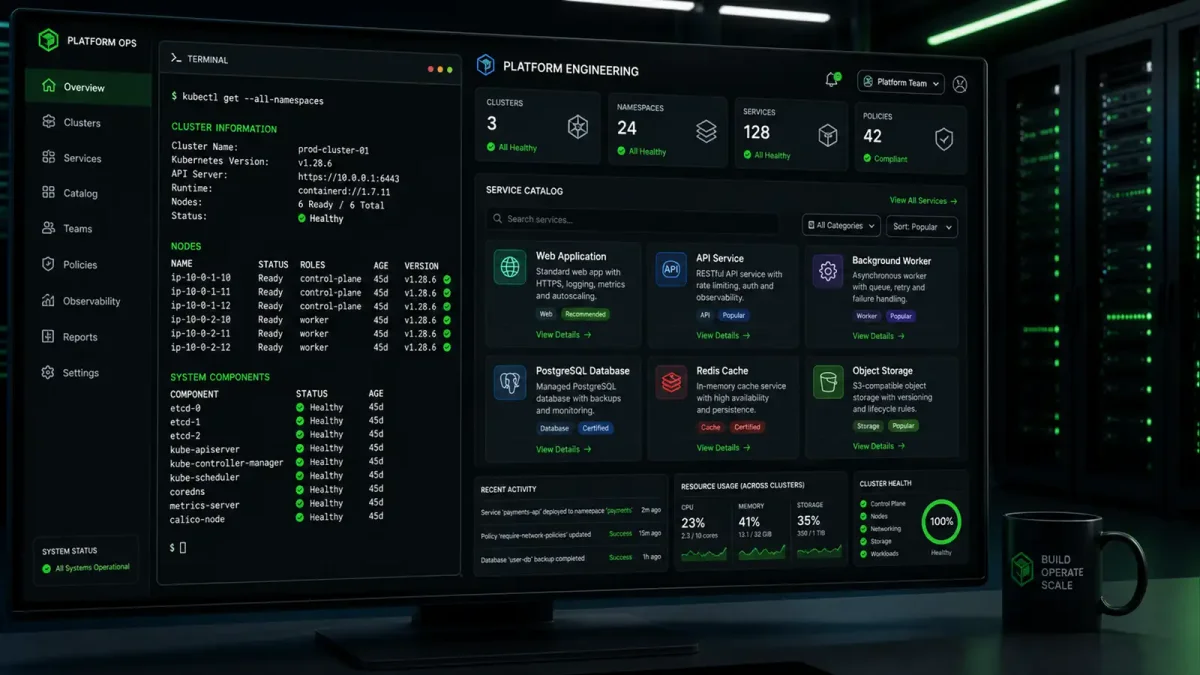
The core concept is the Internal Developer Platform (IDP). An IDP is a layer of abstraction that sits between developers and underlying infrastructure. Instead of developers interacting directly with Kubernetes, cloud APIs, or CI/CD pipelines, they interact with a platform that handles the complexity. The platform provides golden paths, which are opinionated workflows for common tasks like creating a new service, deploying to production, or setting up monitoring.
This does not mean developers lose control. Good platforms expose the right level of abstraction. A developer who needs a new PostgreSQL database gets one through a self-service portal. A developer who needs custom Kubernetes configuration can still access the underlying cluster. The platform makes the common case easy and the uncommon case possible.
The tools that make it work
The platform engineering ecosystem has matured significantly. The Q1 2026 Technology Radar puts Helm at 94% four- or five-star maturity and recommends it for application delivery. Backstage, the open-source developer portal originally built by Spotify, has become the de facto standard for the portal layer. Argo CD leads for GitOps-based deployment, and cert-manager and Keycloak handle security concerns.
Here is a practical stack for building an IDP in 2026:
- Backstage for the developer portal and software catalog
- Kubernetes as the infrastructure layer
- Helm for application packaging and deployment
- Argo CD for GitOps-based continuous delivery
- Keycloak for identity and access management
- Prometheus and Grafana for observability
This stack is not the only option, but it is the most battle-tested combination. Each component has a large community, extensive documentation, and proven production track records.
Building the platform layer by layer
Building an internal developer platform is not a weekend project. It requires careful planning, incremental delivery, and ongoing iteration. The most successful platforms are built in layers, with each layer solving a specific problem and building on the foundation below it.
Layer 1: The developer portal with Backstage
Backstage is the front door of your platform. It provides a software catalog that shows every service, its ownership, its dependencies, and its health status. It offers scaffolding templates that let developers create new services with standardized structure, CI/CD pipelines, and monitoring already configured. Without a portal, developers have to know where to find things. With a portal, everything is discoverable.
Install Backstage on your Kubernetes cluster:
# Create the backstage namespace
kubectl create namespace backstage

# Add the Backstage Helm repository
helm repo add backstage https://backstage.github.io/charts
helm repo update

# Install Backstage with PostgreSQL
helm install backstage backstage/backstage \
  --namespace backstage \
  --set backstage.config.appConfig.catalog.imports.useSingleDefaultUser=true
Once Backstage is running, configure the software catalog to discover services automatically. The catalog uses a YAML file to define entities:
# catalog-info.yaml
apiVersion: backstage.io/v1alpha1
kind: Component
metadata:
  name: my-service
  description: My microservice
  annotations:
    github.com/project-slug: myorg/my-service
    backstage.io/techdocs-ref: dir:.
  tags:
    - python
    - api
  links:
    - url: https://grafana.example.com/d/my-service
      title: Grafana Dashboard
spec:
  type: service
  lifecycle: production
  owner: my-team
  system: my-system
  providesApis:
    - my-service-api
Developers add this file to their repository, and Backstage automatically discovers the service, links it to the team that owns it, and shows its dependencies. This eliminates the “who owns this service?” problem that plagues growing organizations.
Layer 2: Self-service infrastructure with Kubernetes
The platform needs to let developers provision infrastructure without filing tickets. The most effective approach is to define infrastructure as code and expose it through the platform.
Create a set of Helm charts that represent your standard infrastructure patterns:
# helm-chart/values.yaml for a standard microservice
replicaCount: 2
image:
  repository: registry.example.com/my-service
  tag: latest
service:
  type: ClusterIP
  port: 8080
ingress:
  enabled: true
  host: my-service.example.com
monitoring:
  enabled: true
  metricsPath: /metrics
database:
  enabled: false
  type: postgresql
When a developer creates a new service through Backstage, the platform spins up a new Helm release with these defaults. The developer gets a working service with ingress, monitoring, and optional database provisioning, all without touching a YAML file or filing a ticket.
The key principle is that the platform team maintains the Helm charts, and developers customize through values files. This gives developers autonomy while maintaining consistency.
Layer 3: GitOps deployment with Argo CD
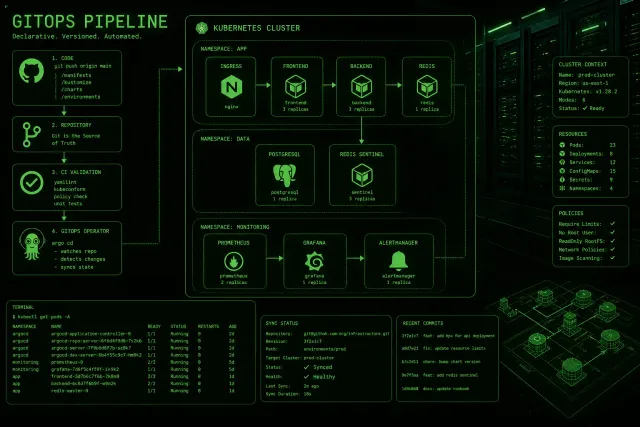
GitOps makes deployment declarative and auditable. The developer pushes code, CI builds and tests it, and Argo CD detects the change and deploys it. No manual kubectl commands, no SSH into servers, no deployment windows. The entire deployment history is stored in Git, which means you can audit every change, roll back to any previous state, and reproduce deployments exactly.
This is a significant shift from traditional deployment approaches. Instead of imperative scripts that run commands, you declare the desired state in Git, and Argo CD reconciles the actual state with the desired state. If someone manually changes a resource, Argo CD detects the drift and corrects it. If a deployment fails, you revert the Git commit and Argo CD rolls back automatically.
Install Argo CD:
kubectl create namespace argocd
kubectl apply -n argocd -f https://raw.githubusercontent.com/argoproj/argo-cd/stable/manifests/install.yaml
Configure Argo CD to watch your Git repositories:
# argocd-application.yaml
apiVersion: argoproj.io/v1alpha1
kind: Application
metadata:
  name: my-service
  namespace: argocd
spec:
  project: default
  source:
    repoURL: https://github.com/myorg/my-service-deploy
    targetRevision: HEAD
    path: k8s/overlays/production
  destination:
    server: https://kubernetes.default.svc
    namespace: my-service
  syncPolicy:
    automated:
      prune: true
      selfHeal: true
With this configuration, any change to the deployment repository automatically triggers a sync. If someone manually modifies a resource in the cluster, Argo CD detects the drift and corrects it. This is the self-healing property that makes GitOps powerful.
Layer 4: Identity and access with Keycloak
Platform engineering requires proper identity management. Developers need to authenticate to the platform, and services need to authenticate to each other. Keycloak provides both, and it integrates cleanly with the rest of the stack.
Keycloak integrates with Backstage for developer authentication and with Kubernetes for service authentication. It supports OIDC, SAML, and LDAP, making it flexible enough for most enterprise environments. The integration with Kubernetes means that developer permissions are enforced at the cluster level, not just at the portal level.
The critical security property is that developers do not have cluster-admin access by default. The platform provides scoped permissions: a developer can deploy their own service but cannot modify another team’s infrastructure. Keycloak enforces these boundaries through role-based access control that maps to Kubernetes RBAC. This principle of least privilege is essential for platform security, especially as the number of developers and services grows.
Measuring success
Platform engineering is a product discipline, and products need metrics. The four key metrics to track are:
Deployment frequency: How often does code reach production? Before the platform, teams might deploy weekly. After, they should deploy multiple times per day.
Lead time for changes: How long from code commit to production? The platform should reduce this from days to hours.
Developer satisfaction: Survey developers regularly. Ask whether the platform makes their job easier, whether documentation is adequate, and whether they would recommend it to a colleague.
Platform adoption rate: What percentage of services are deployed through the platform versus manual processes? If developers are bypassing the platform, something is wrong with the platform.
The goal is not to force adoption. It is to build something so useful that developers choose it. The platform team that treats developers as customers, listens to feedback, and iterates quickly will see adoption grow naturally.
Common mistakes to avoid
The most common failure in platform engineering is building what the platform team thinks developers need instead of what developers actually need. Talk to developers. Watch how they work. Identify the friction points. Build tools that remove those friction points. The platform that nobody uses is worse than no platform at all, because it wastes engineering time and creates the false impression that the problem has been solved.
Another mistake is trying to boil the ocean. Do not build a platform that handles every possible use case on day one. Start with the most common pain point, build a solution, measure its impact, and expand from there. A platform that handles 80% of use cases well is better than one that handles 100% of use cases poorly. The remaining 20% can be addressed in subsequent iterations.
The third mistake is treating the platform as a one-time project instead of a product. Platforms need ongoing maintenance, updates, and feature development. The platform team needs to operate like a product team, with a roadmap, sprint cycles, and customer feedback loops. If you build a platform and then stop investing in it, it will become stale within months as developer needs evolve and new tools emerge.
A fourth mistake is building the platform in isolation. The platform team should be embedded with the development teams it serves, not isolated in a separate organization. Proximity creates empathy. When platform engineers sit with developers and watch them struggle with the current tooling, they build better solutions. When they sit in a separate building and receive tickets, they build solutions to the wrong problems.
What comes next
Platform engineering is not going away. The CNCF data shows adoption accelerating, and the economic argument is clear: platform teams that can scale their services beyond their headcount remove a bottleneck that affects every developer in the organization.
The next frontier is AI-assisted platform engineering. Early experiments show that AI agents can handle routine platform tasks like capacity planning, anomaly detection, and incident response. The platform team that builds the right abstractions today will be well-positioned to integrate AI capabilities tomorrow.
Start with one layer. Pick the biggest pain point in your organization. Build a self-service solution. Measure its impact. Then build the next layer. The platform will grow organically, and so will the benefits. The teams that start now will have a significant advantage over those that wait for the perfect solution. Perfect is the enemy of good enough, and good enough deployed today beats perfect deployed never. Start building.