Why Build Caching Matters
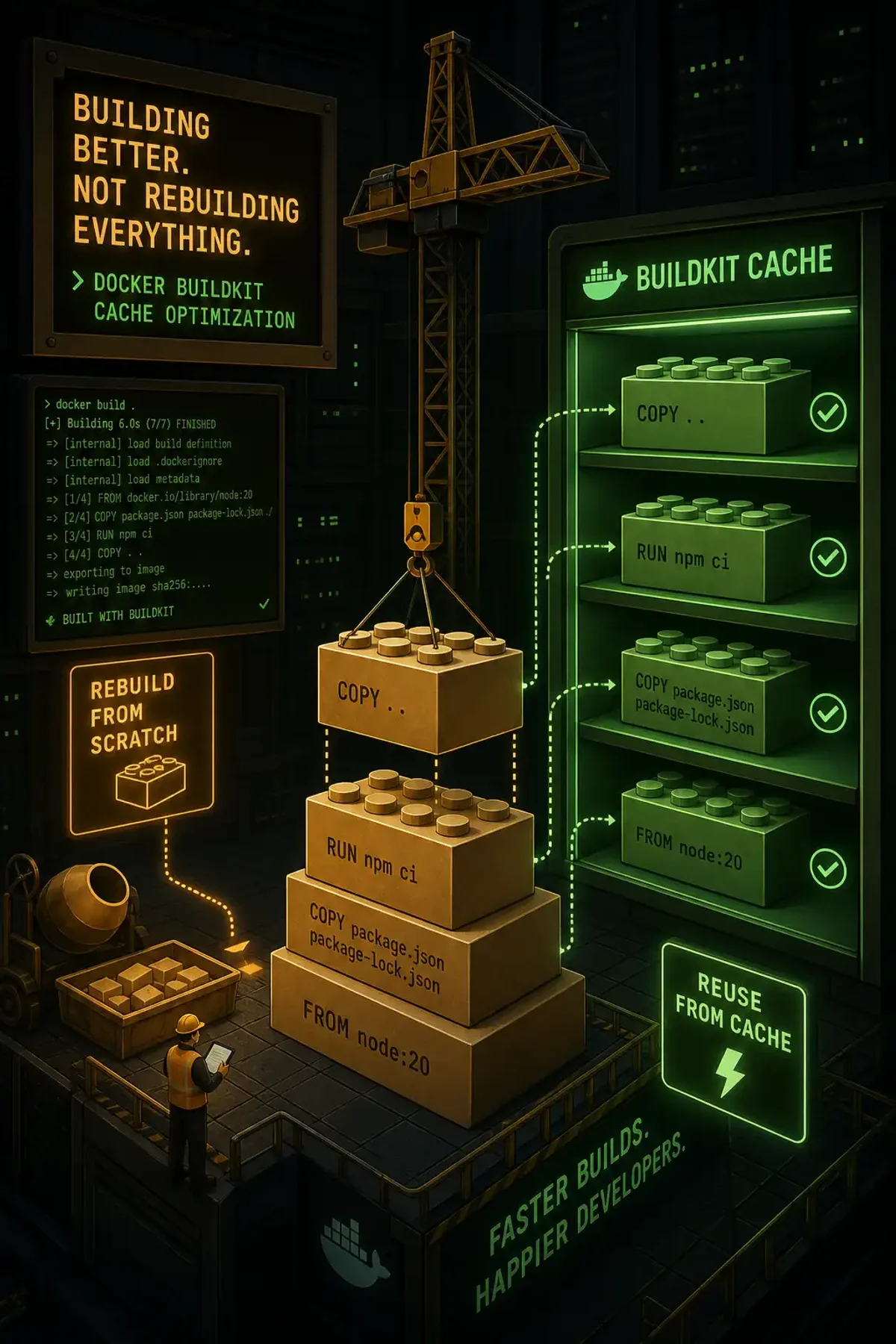
Every docker build runs through your Dockerfile layer by layer. When a layer’s inputs haven’t changed, BuildKit reuses the cached result. Get this right and a 10-minute build drops to 30 seconds. Get it wrong and you’re reinstalling dependencies on every push.
The most common culprit: COPY . . too early in the Dockerfile. Change one comment and every layer below it rebuilds.
Cache Mounts: BuildKit’s Secret Weapon
BuildKit introduced cache mounts via --mount=type=cache in RUN instructions. This persists a directory across builds:
# Every build downloads packages
RUN apt-get update && apt-get install -y build-essential curl

# Cache persists /var/cache/apt across builds
RUN --mount=type=cache,target=/var/cache/apt \
    --mount=type=cache,target=/var/lib/apt \
    apt-get update && apt-get install -y build-essential curl
This works with every package manager:
# Python
RUN --mount=type=cache,target=/root/.cache/pip \
    pip install -r requirements.txt

# Node.js
RUN --mount=type=cache,target=/root/.npm \
    npm ci

# Go
RUN --mount=type=cache,target=/go/pkg/mod \
    go mod download
Layer Ordering
The rule: put things that change least first.
# BAD — any file change triggers full npm ci
COPY . .
RUN npm ci
RUN npm run build

# GOOD — npm ci only reruns when package.json changes
COPY package.json package-lock.json ./
RUN --mount=type=cache,target=/root/.npm npm ci
COPY . .
RUN npm run build
Registry Cache for CI/CD
In CI, each runner starts with an empty cache. Registry cache solves this:
docker build \
  --cache-to type=registry,ref=myregistry.com/app:cache,mode=max \
  --cache-from type=registry,ref=myregistry.com/app:cache \
  -t myregistry.com/app:latest .
mode=max exports cache for all layers, not just the final image. Essential for maximum reuse.
Measuring Impact
Use --progress=plain to see which layers hit the cache:
docker build --progress=plain .
# #5 CACHED  ← cache hit
# #6 DONE 0.3s  ← rebuilt
Common Pitfalls
- ARG before RUN: Any ARG that changes invalidates the cache below it. Define ARG as late as possible.
- Missing .dockerignore: Without it,
COPY . .includes node_modules and .git, invalidating cache on every build. - Timestamp changes: Even if file content is identical, a changed timestamp invalidates the COPY cache.
Summary
The hierarchy from most to least impactful: write a good .dockerignore → order layers by change frequency → use cache mounts → enable registry cache in CI/CD → use multi-stage builds with named targets.