Why Btrfs Snapshots for Backup
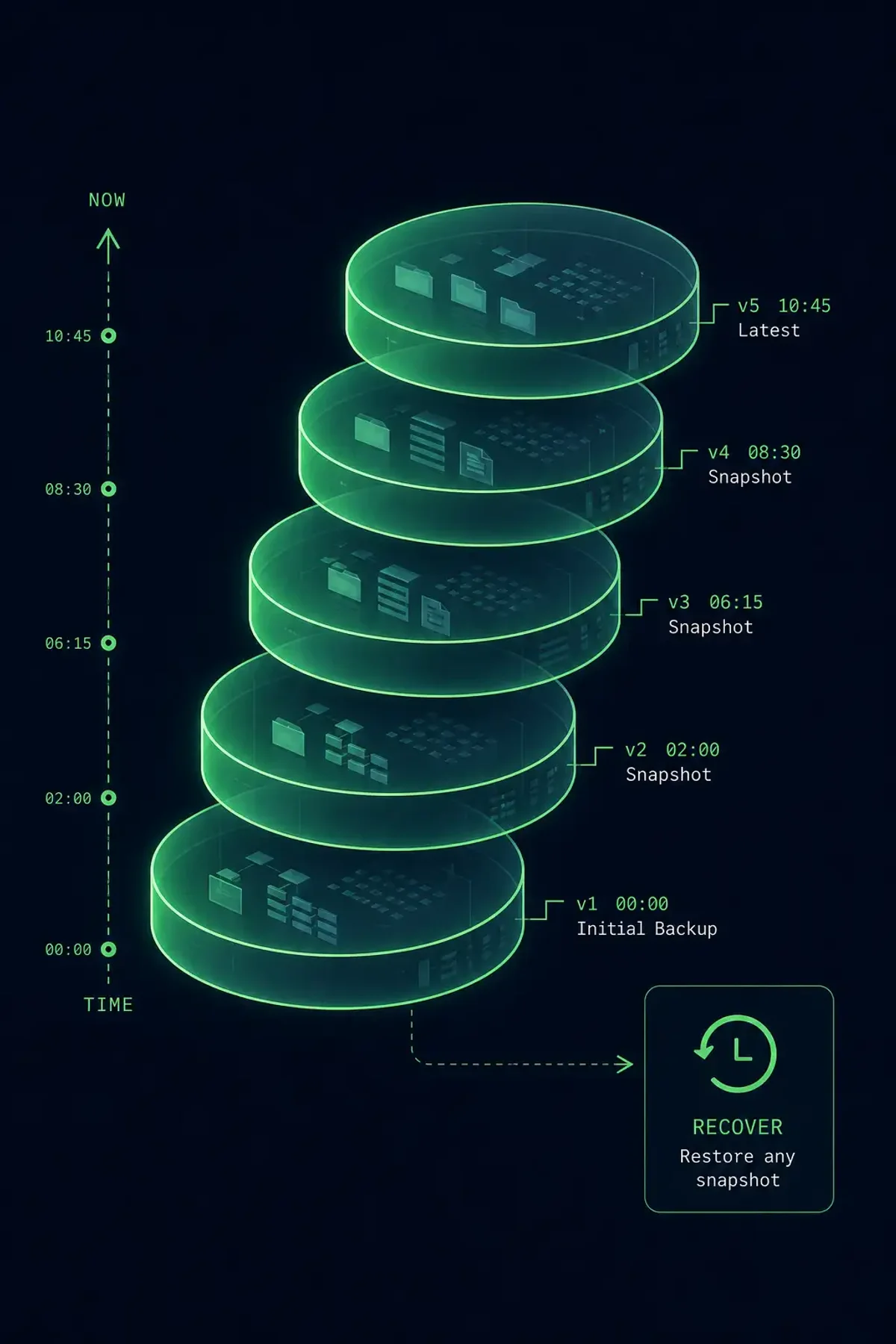
Traditional backup tools copy files from one location to another. Btrfs snapshots don’t copy anything — they create a point-in-time reference to the filesystem state using copy-on-write. A snapshot of a 500 GB volume takes less than a second and uses almost no space. Only changed blocks consume additional space.
Combined with btrfs send/receive, you get incremental backups that transfer only the differences between snapshots. This is essentially rsync for the filesystem level, but faster and atomic.
Creating Your First Snapshot
# Create a read-only snapshot
sudo btrfs subvolume snapshot -r /mnt/data /mnt/snapshots/data-2026-04-17

# List snapshots
sudo btrfs subvolume list /mnt/data

# Check space used by snapshots
sudo btrfs filesystem du -s /mnt/snapshots/*
The snapshot is instant and initially uses 0 additional bytes. As the original subvolume changes, the snapshot retains the original blocks and its size grows.
Snapshot Rotation with Retention
A production backup strategy needs automatic snapshot creation and rotation:
#!/bin/bash
# /usr/local/bin/btrfs-snapshot.sh
SUBVOL="/mnt/data"
SNAPDIR="/mnt/snapshots"
DATE=$(date +%Y-%m-%d_%H%M)

# Create snapshot
btrfs subvolume snapshot -r "$SUBVOL" "$SNAPDIR/data-$DATE"

# Keep last 7 daily, 4 weekly, 3 monthly
# Delete snapshots older than retention policy
find "$SNAPDIR" -maxdepth 1 -name "data-*" -mtime +7 | sort | head -n -7 | xargs -r btrfs subvolume delete
Add to systemd timer for automation.
Sending Snapshots to a Backup Server
The real power of Btrfs is send/receive — incremental, atomic filesystem transfers:
First full backup:
# On source server
sudo btrfs send /mnt/snapshots/data-2026-04-17 | \
  ssh backup-server "btrfs receive /mnt/backups/"
Incremental backup (only changes since last snapshot):
# Send the difference between two snapshots
sudo btrfs send -p /mnt/snapshots/data-2026-04-16 \
  /mnt/snapshots/data-2026-04-17 | \
  ssh backup-server "btrfs receive /mnt/backups/"
The -p flag specifies the parent snapshot. Btrfs calculates the block-level diff and sends only changed data. If only 50 MB changed in a 500 GB filesystem, the transfer is 50 MB.
Automated Incremental Backup Script
#!/bin/bash
# /usr/local/bin/btrfs-backup-send.sh
set -e

REMOTE="backup-server"
REMOTE_PATH="/mnt/backups/data"
LOCAL_SNAPSHOTS="/mnt/snapshots"

# Find latest local snapshot
LATEST_SNAP=$(ls -1t "$LOCAL_SNAPSHOTS/data-"* 2>/dev/null | head -1)
[ -z "$LATEST_SNAP" ] && exit 1

# Find latest snapshot on remote
LATEST_REMOTE=$(ssh "$REMOTE" "ls -1t $REMOTE_PATH/data-"* 2>/dev/null | head -1)

if [ -z "$LATEST_REMOTE" ]; then
    # No remote snapshots — full send
    echo "Full backup..."
    btrfs send "$LATEST_SNAP" | ssh "$REMOTE" "btrfs receive $REMOTE_PATH/"
else
    # Incremental send
    echo "Incremental backup..."
    btrfs send -p "$LATEST_REMOTE" "$LATEST_SNAP" | \
        ssh "$REMOTE" "btrfs receive $REMOTE_PATH/"
fi

echo "Backup complete"
Restoring from Snapshots
Local restore:
# Create a writable snapshot of the backup
sudo btrfs subvolume snapshot /mnt/snapshots/data-2026-04-17 /mnt/restore
# Mount and recover files
sudo mount /mnt/restore /mnt/recovery
Remote restore (fetch from backup server):
ssh backup-server "btrfs send /mnt/backups/data/data-2026-04-17" | \
  sudo btrfs receive /mnt/restore/
Checking Snapshot Differences
# See what files changed between snapshots
sudo btrfs subvolume find-new /mnt/data $(btrfs subvolume list -r /mnt/snapshots | tail -2 | head -1 | awk '{print $NF}')

# Compare two snapshots
sudo rsync -avun --delete /mnt/snapshots/data-2026-04-16/ /mnt/snapshots/data-2026-04-17/ | head -20
Space Management
Snapshots grow over time as the original data changes. Monitor space:
# Overall Btrfs usage
sudo btrfs filesystem usage /mnt/data

# Per-snapshot exclusive data
sudo btrfs qgroup show /mnt/data
If snapshots consume too much space, delete older ones:
sudo btrfs subvolume delete /mnt/snapshots/data-2026-03-01Production Considerations
- Snapshots are not backups alone: They protect against accidental deletion but not disk failure. Always send snapshots to a different physical machine.
- Quota: Enable qgroups to track per-snapshot usage and prevent runaways.
- Subvolume layout: Plan your subvolume hierarchy before deployment. Flat layouts (one subvolume per dataset) are easier to manage than nested ones.
- Compression: Enable filesystem-level compression (
compress=zstd) to reduce both storage and network transfer size.
Summary
Btrfs send/receive replaces rsync for filesystem-level backups. Snapshots are instant and atomic, incremental sends transfer only changed blocks, and restore is as simple as receiving the snapshot back. For database servers, combine with database-level dump tools for application-consistent backups.