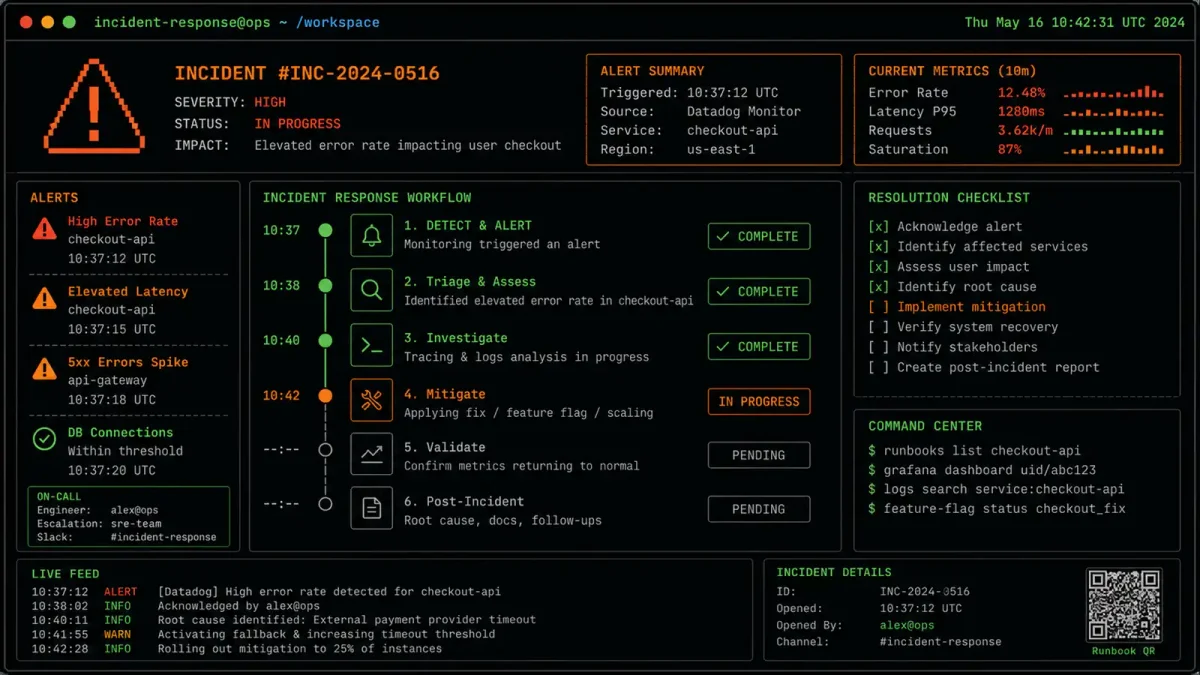
When production breaks at 3 AM, the difference between a 30-minute fix and a 4-hour outage is usually not the severity of the problem. It is whether someone on the team has a written procedure to follow. Incident response runbooks are those procedures, and most teams either do not have them or have ones that nobody trusts enough to use.
A runbook is a step-by-step guide for responding to a specific type of incident. It tells the responder what to check first, what commands to run, what to expect, and when to escalate. The goal is not to replace human judgment. It is to remove the cognitive load of remembering procedures during a crisis, when stress makes people forget even familiar steps.
The value of runbooks compounds across incidents. A team that handles three incidents per week with runbooks will accumulate institutional knowledge faster than a team that handles the same incidents through ad-hoc troubleshooting. Over time, the runbook team develops better instincts, catches problems earlier, and resolves them faster — not because individual engineers are smarter, but because the collective knowledge is captured and reusable.
Why most runbooks fail
The most common failure mode for runbooks is that they become stale. Someone writes a runbook during a quiet week, it gets committed to a wiki, and nobody looks at it again until the next incident. By then, the infrastructure has changed, the commands are outdated, and the runbook leads the responder down the wrong path. The team learns to distrust runbooks, and the next incident happens without any written guidance.
The second failure mode is vagueness. A runbook that says “check the logs” is not useful. A runbook that says “run journalctl -u nginx --since '5 minutes ago' | grep -i error and look for 502 or 503 status codes” is useful. The difference is specificity. Every step in a runbook should be a command the responder can copy and paste, with expected output that tells them whether to proceed or escalate.
The third failure mode is treating runbooks as documentation rather than tools. Runbooks should be living documents that get updated after every incident. If a responder finds that a step does not work, they should fix it immediately, not file a ticket for later. The runbook is the team’s institutional memory, and institutional memory that is out of date is worse than no memory at all.
A fourth failure mode is writing runbooks for incidents that never happen. Teams sometimes build comprehensive runbooks for exotic failure scenarios while ignoring the common ones. The return on investment for runbook writing is highest for frequent incidents. A runbook that gets used twice a month is worth ten runbooks that get used once a year.
Building your first runbook
Start with the incidents that happen most frequently. Check your alert history or incident log for the past three months. The top three to five incident types are where your runbooks will have the most impact. Do not try to write runbooks for every possible failure. Focus on the ones that actually happen.
For each incident type, structure the runbook with these sections:
Detection: How do you know this incident is happening? What alert fired? What does the dashboard show? This section helps the responder confirm they are dealing with the right problem before they start fixing it.
Impact assessment: What is the blast radius? Which users or services are affected? This section helps the responder decide how urgently to act and who to notify.
Immediate mitigation: What is the fastest way to reduce impact, even if it is not the permanent fix? This might be restarting a service, failing over to a backup, or rolling back a deployment. The goal is to restore service first, then investigate root cause.
Root cause investigation: Once the immediate fire is out, how do you figure out what went wrong? What logs to check, what metrics to review, what configuration changes to audit.
Resolution and recovery: How do you fix the underlying problem and restore normal operations? This might involve deploying a patch, scaling resources, or fixing a configuration.
Verification: How do you confirm the fix worked? What checks should you run to make sure the incident is truly resolved?
Each section should be written in the imperative mood. Write “Run this command” not “You should run this command.” Write “Check the error rate in Grafana” not “It might be helpful to check the error rate.” The imperative voice is clearer, faster to read, and easier to follow under pressure.
Example runbook: high CPU alert
Here is a concrete example of what a runbook looks like in practice. This one handles a common scenario: an alert fires because a server’s CPU usage exceeds 90% for more than five minutes.
# Step 1: Confirm the alert
ssh admin@affected-server
uptime
# Expected: load average above 4.0 on a 2-core server

# Step 2: Identify the top process
top -bn1 | head -20
# Expected: one process consuming disproportionate CPU

# Step 3: Check if it is a known process
# Compare the PID and process name against your service inventory
ps aux | grep <PID>
# Expected: output shows the service name and command line

# Step 4: Check recent deployments
# If the high CPU started after a deployment, consider rollback
git log --oneline -5 /path/to/service/
# Expected: timestamp of last deployment matches CPU spike

# Step 5: Immediate mitigation
# Option A: Restart the service
sudo systemctl restart <service-name>

# Option B: If the process is a runaway batch job, kill it
sudo kill -9 <PID>

# Option C: If the server is overloaded, scale horizontally
# (add another instance behind the load balancer)

# Step 6: Verify recovery
watch -n 5 'uptime; top -bn1 | head -5'
# Expected: load average drops below 2.0 within 2 minutes

# Step 7: Notify the team
# Post in #incidents channel with:
# - What happened
# - What you did
# - Current status
# - Whether root cause investigation is needed
This runbook is specific enough that a junior engineer who has never handled this incident type could follow it. That is the standard. If your runbook requires the reader to already know the answer, it is not doing its job.
Automating runbook steps
Once you have written runbooks for your most common incidents, the next step is automating the repetitive parts. The goal is not to remove the human from the loop entirely — you still want someone making decisions — but to automate the diagnostic commands and data collection.
A simple approach is to write a shell script that runs the diagnostic commands from your runbook and outputs a summary. The responder runs one command instead of ten, and the output is formatted consistently every time.
#!/bin/bash
# incident-diagnose.sh - Quick diagnostic summary
echo "=== System Status ==="
uptime
echo ""
echo "=== Top 5 CPU Processes ==="
ps aux --sort=-%cpu | head -6
echo ""
echo "=== Top 5 Memory Processes ==="
ps aux --sort=-%mem | head -6
echo ""
echo "=== Disk Usage ==="
df -h | grep -v tmpfs
echo ""
echo "=== Recent System Log Errors ==="
journalctl -p err --since "30 minutes ago" --no-pager | tail -20
echo ""
echo "=== Network Connections ==="
ss -tuln | head -20
This script takes 30 seconds to run and produces a snapshot that would take 5-10 minutes to gather manually. During an incident, that time savings compounds across every responder who runs it.
More advanced automation uses tools like Ansible or Terraform to execute runbook steps. You can create Ansible playbooks that mirror your runbook procedures, so the responder runs ansible-playbook runbooks/high-cpu.yml instead of executing individual commands. This approach has the added benefit of being version-controlled and peer-reviewed, like any other code.
The automation does not need to be perfect on the first pass. Start by automating the data collection steps — the commands that gather information but do not change anything. Leave the remediation steps manual until you are confident the automation works correctly. A script that collects diagnostic data safely is immediately useful; a script that restarts services incorrectly can make things worse.
The postmortem connection
Runbooks and postmortems form a feedback loop. Every incident should produce a postmortem that answers three questions: what happened, why it happened, and how do we prevent it from happening again. The postmortem should also answer a fourth question: does the runbook need to be updated?
If the responder followed the runbook and the incident was resolved quickly, the runbook worked. If the responder had to improvise because the runbook was outdated or incomplete, update the runbook with what actually worked. If the runbook was followed but the incident still took too long to resolve, the runbook needs more detail or the team needs more training.
The postmortem template should include a section for runbook improvements. After every incident, ask: what step in the runbook was wrong, missing, or unclear? The answer gets added to the runbook before the postmortem is closed. This ensures that every incident makes the team better prepared for the next one.
A good postmortem also captures the timeline of events. How long between the alert firing and the responder acknowledging it? How long between acknowledgment and first diagnostic command? How long between diagnosis and mitigation? These timestamps help identify where the runbook can be tightened. If responders consistently spend 10 minutes on a step that should take 2, that step needs to be broken down or automated.
Maintaining runbooks over time
Runbooks degrade without maintenance. Services change, configurations evolve, and the commands that worked six months ago may not work today. The best teams treat runbook maintenance as a regular task, not an afterthought.
One effective practice is to add a “last verified” date to each runbook. Every quarter, someone on the team goes through each runbook and actually runs the commands to verify they still work. If a command fails, it gets updated. If a step is no longer relevant, it gets removed. This quarterly audit keeps runbooks current without requiring constant attention.
Another practice is to link runbooks to specific alerts. When an alert fires, it should include a link to the relevant runbook. This eliminates the “which runbook do I need?” problem and ensures that responders always have the right procedure available. Most monitoring tools support adding links to alert annotations, and the effort to set this up is minimal compared to the time saved during incidents.
Version control matters too. Store runbooks in the same repository as your infrastructure code, or at least in a repository that the operations team has write access to. When someone updates a runbook, the change gets reviewed and merged like any other code change. This creates a clear history of runbook modifications and ensures that changes are deliberate rather than accidental.
Getting started
If your team does not have runbooks, start with one. Pick the incident that happens most often, write the runbook for it, and use it the next time that incident occurs. After the incident, update the runbook based on what you learned. Then write the next one.
The goal is not perfection. A runbook that is 80% correct and gets used is infinitely more valuable than a perfect runbook that sits in a wiki. Start with what you have, improve it every time you use it, and build the habit of reaching for the runbook before reaching for the keyboard.
The teams that handle incidents well are not the ones with the most experienced engineers. They are the ones with the best procedures, and the discipline to keep those procedures current. Runbooks are how you build that discipline. The first runbook you write will be rough. The tenth will be noticeably sharper. The hundredth will be the reason your entire team sleeps peacefully and soundly through the night instead of scrambling through an outage. Start writing today.