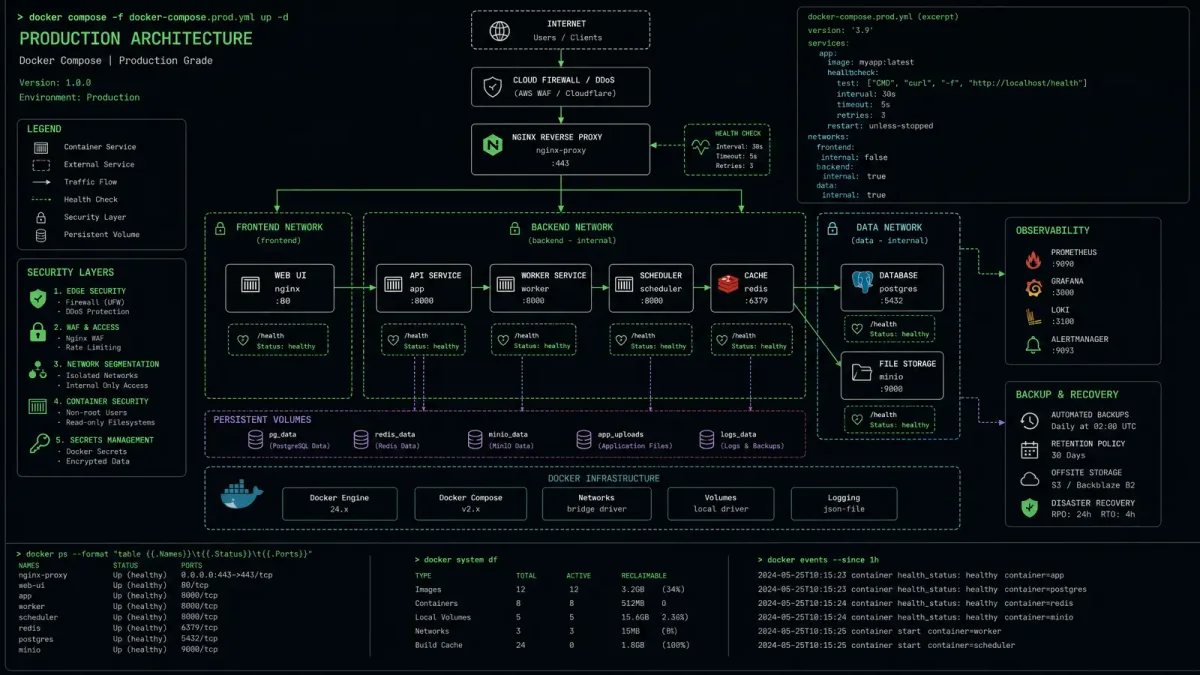
Docker Compose has evolved from a simple development tool into a viable production orchestration solution for small to medium deployments. But running containers in production demands far more than a basic docker-compose.yml file.
This guide covers eight production-ready patterns that transform your Docker Compose deployments from fragile prototypes into resilient, secure infrastructure — including lessons from recent container security vulnerabilities.
1. Pin Your Image Versions
One of the most common production failures comes from unpinned image tags. When you use latest or even major version tags like nginx:1.25, you risk pulling incompatible or vulnerable images during deployment.
services:
  web:
    image: nginx:1.27.0-alpine@sha256:a3b2c...
    # Never use: image: nginx:latest
Pin both the tag AND the digest for reproducible builds. The digest ensures you get exactly the image you tested, regardless of tag reassignment. With recent supply chain attacks targeting container registries, this defense-in-depth approach is no longer optional.
Security note: The June 2026 wave of critical vulnerabilities (including CVSS 9.2 flaws in NGINX patched by F5) shows how quickly container-adjacent services can become attack vectors. Pinning versions gives you control over when and how you update.
2. Implement Layered Health Checks
Health checks in production need multiple layers. A single endpoint check isn’t enough to verify container health.
services:
  api:
    image: myapp:2.1.0
    healthcheck:
      test: ["CMD", "curl", "-f", "http://localhost:8080/health"]
      interval: 15s
      timeout: 5s
      retries: 3
      start_period: 30s
    deploy:
      restart_policy:
        condition: on-failure
        max_attempts: 3
The start_period is critical — it gives your application time to initialize before health checks count as failures. Without it, slow-starting services get caught in restart loops.
Consider adding a secondary dependency check:
    healthcheck:
      test: >
        curl -f http://localhost:8080/health &&
        curl -f http://localhost:8080/ready &&
        pg_isready -h db -U postgres
This verifies not just that the container is running, but that it can reach its dependencies and is actually ready to serve traffic.
3. Segment Your Networks
Don’t let all your containers talk to each other freely. Network segmentation limits blast radius when a container is compromised.
services:
  frontend:
    networks:
      - public
      - backend
  api:
    networks:
      - backend
      - database
  db:
    networks:
      - database

networks:
  public:
    driver: bridge
  backend:
    driver: bridge
    internal: false
  database:
    driver: bridge
    internal: true
The internal: true flag on the database network means those containers have no outbound internet access. Even if an attacker exploits a database vulnerability, they can’t reach out to download additional tools or exfiltrate data.
4. Manage Secrets Properly
Never hardcode passwords in your compose file or .env files that get committed to version control.
secrets:
  db_password:
    file: ./secrets/db_password.txt
  api_key:
    environment: API_KEY_FILE

services:
  api:
    image: myapp:2.1.0
    secrets:
      - db_password
      - api_key
    environment:
      - DATABASE_PASSWORD_FILE=/run/secrets/db_password
      - API_KEY_FILE=/run/secrets/api_key
Docker secrets are mounted as files in /run/secrets/ inside the container, keeping them out of environment variable listings and process trees. This is especially important given how recent vulnerability exploits target exposed configuration endpoints.
For production, use an external secrets manager like HashiCorp Vault and inject secrets at runtime rather than relying on static files.
5. Use Resource Limits
Without resource constraints, a single misbehaving container can starve the entire host.
services:
  api:
    deploy:
      resources:
        limits:
          cpus: '2.0'
          memory: 1G
        reservations:
          cpus: '0.5'
          memory: 256M
Resource limits prevent noisy-neighbor problems and ensure critical services always have minimum resources. Set reservations for your most important services and limits for everything else.
Monitor resource usage first, then tune these values. Starting with overly restrictive limits causes more problems than no limits at all.
6. Implement Logging Strategy
Docker’s default JSON file logging can quickly consume all available disk space. Configure log rotation at the service level:
services:
  api:
    logging:
      driver: json-file
      options:
        max-size: "50m"
        max-file: "3"
        compress: "true"
Or use a centralized logging driver:
    logging:
      driver: fluentd
      options:
        fluentd-address: localhost:24224
        tag: "docker.{{.Name}}"
For production environments with compliance requirements, centralized logging with structured JSON output makes debugging and auditing significantly easier.
7. Plan Your Update Strategy
Zero-downtime updates require careful planning in Docker Compose. The docker compose up -d approach restarts services in place, causing brief outages.
For rolling updates, use labels and a deployment script:
services:
  api:
    image: myapp:${APP_VERSION:-latest}
    labels:
      - "com.serverhi.version=${APP_VERSION}"
      - "com.serverhi.service=api"
    healthcheck:
      test: ["CMD", "curl", "-f", "http://localhost:8080/health"]
      interval: 10s
      timeout: 5s
      retries: 3
Update script:
#!/bin/bash
export APP_VERSION="2.1.0"
docker compose pull api
docker compose up -d api
# Wait for health check to pass
until docker compose exec api curl -sf http://localhost:8080/health > /dev/null; do
  echo "Waiting for api to be healthy..."
  sleep 5
done
echo "Update complete - api is healthy"
The health check wait loop ensures the new version is actually serving traffic before you consider the update complete.
8. Build Security Scanning Into Your Pipeline
The speed at which vulnerabilities move from disclosure to exploitation has accelerated dramatically. In June 2026, a critical Splunk Enterprise vulnerability (CVE-2026-20253) was exploited within days of disclosure, with a proof-of-concept published just 48 hours later. CISA mandated patching within three days.
Integrate image scanning into your deployment workflow:
# docker-compose.security.yml
services:
  trivy:
    image: aquasec/trivy:0.52
    volumes:
      - /var/run/docker.sock:/var/run/docker.sock
    command: image --severity HIGH,CRITICAL --exit-code 1 myapp:2.1.0
Run this before deploying any new image version. Pair it with automated update notifications from your base image maintainers.
Putting It All Together
Here’s a production-ready Docker Compose file incorporating all eight patterns:
version: "3.8"

secrets:
  db_password:
    file: ./secrets/db_password.txt

services:
  frontend:
    image: nginx:1.27.0-alpine@sha256:abc123...
    ports:
      - "80:80"
      - "443:443"
    networks:
      - public
      - backend
    volumes:
      - ./nginx.conf:/etc/nginx/nginx.conf:ro
    healthcheck:
      test: ["CMD", "curl", "-f", "http://localhost:80"]
      interval: 15s
      timeout: 5s
      retries: 3
    logging:
      driver: json-file
      options:
        max-size: "50m"
        max-file: "3"
    deploy:
      resources:
        limits:
          cpus: '1.0'
          memory: 512M

  api:
    image: myapp:2.1.0@sha256:def456...
    networks:
      - backend
      - database
    secrets:
      - db_password
    environment:
      - DATABASE_PASSWORD_FILE=/run/secrets/db_password
      - DATABASE_URL=postgres://api:***@db:5432/myapp
    healthcheck:
      test: ["CMD", "curl", "-f", "http://localhost:8080/health"]
      interval: 15s
      timeout: 5s
      retries: 3
      start_period: 30s
    logging:
      driver: json-file
      options:
        max-size: "50m"
        max-file: "3"
    deploy:
      resources:
        limits:
          cpus: '2.0'
          memory: 1G
      restart_policy:
        condition: on-failure
        max_attempts: 3

  db:
    image: postgres:16.3-alpine@sha256:ghi789...
    networks:
      - database
    volumes:
      - pgdata:/var/lib/postgresql/data
    secrets:
      - db_password
    environment:
      - POSTGRES_PASSWORD_FILE=/run/secrets/db_password
      - POSTGRES_DB=myapp
    healthcheck:
      test: ["CMD-SHELL", "pg_isready -U postgres"]
      interval: 10s
      timeout: 5s
      retries: 5
    logging:
      driver: json-file
      options:
        max-size: "50m"
        max-file: "3"
    deploy:
      resources:
        limits:
          cpus: '2.0'
          memory: 2G

networks:
  public:
    driver: bridge
  backend:
    driver: bridge
  database:
    driver: bridge
    internal: true

volumes:
  pgdata:
This configuration gives you:
- Pinned images with digest verification
- Three-tier network segmentation with internal database network
- Docker secrets for sensitive configuration
- Health checks on every service with appropriate start periods
- Resource limits to prevent runaway containers
- Log rotation to prevent disk exhaustion
- Restart policies for automatic recovery
- Volume persistence for database data
When to Graduate Beyond Docker Compose
Docker Compose works well for:
- Single-host deployments
- Teams under 10 developers
- Applications with fewer than 15 services
- Development and staging environments
Consider Kubernetes or Docker Swarm when you need:
- Multi-host orchestration
- Auto-scaling based on load
- Zero-downtime rolling deployments at scale
- Advanced scheduling constraints
- Service mesh capabilities
For most small to medium production workloads, Docker Compose with the patterns above provides the right balance of simplicity and reliability.