If you manage Linux servers in an enterprise environment, there is a decent chance that some of them have been running without endpoint protection since their last reboot and you do not know it.
A Microsoft Defender for Endpoint update released in late July 2026 introduced a bug that causes the agent to silently disable itself on Linux systems after a reboot. The agent does not crash. It does not log an error to syslog that would trigger an alert. It just goes inactive and stays that way until an administrator notices. Microsoft has released a fix in platform build 101.26042.0011, but the fix does not retroactively re-enable agents that were already disabled by the bug. You have to check and re-enable them manually. [1]
What Happened
The issue affects Linux endpoints running Microsoft Defender for Endpoint that received the problematic update and were subsequently rebooted. After the reboot, the Defender agent remains installed and visible in the Microsoft Defender portal, but its antivirus and endpoint detection capabilities are inactive. The portal reports the endpoint as healthy because the agent process is running — but the protection engine is not.
This is a particularly dangerous failure mode because it is silent. Most monitoring systems check whether a process is running, not whether the process is actually doing its job. If your monitoring stack runs systemctl status mdatp or checks ps aux | grep mdatp, it will report everything as normal. The agent binary is there. The service is running. The protection is gone.
The window of exposure for any given server starts at its first reboot after the bad update was installed and ends when an administrator manually verifies and re-enables the agent. For servers that reboot monthly as part of scheduled patch cycles, that window could be weeks. [1]
How to Check If You Are Affected
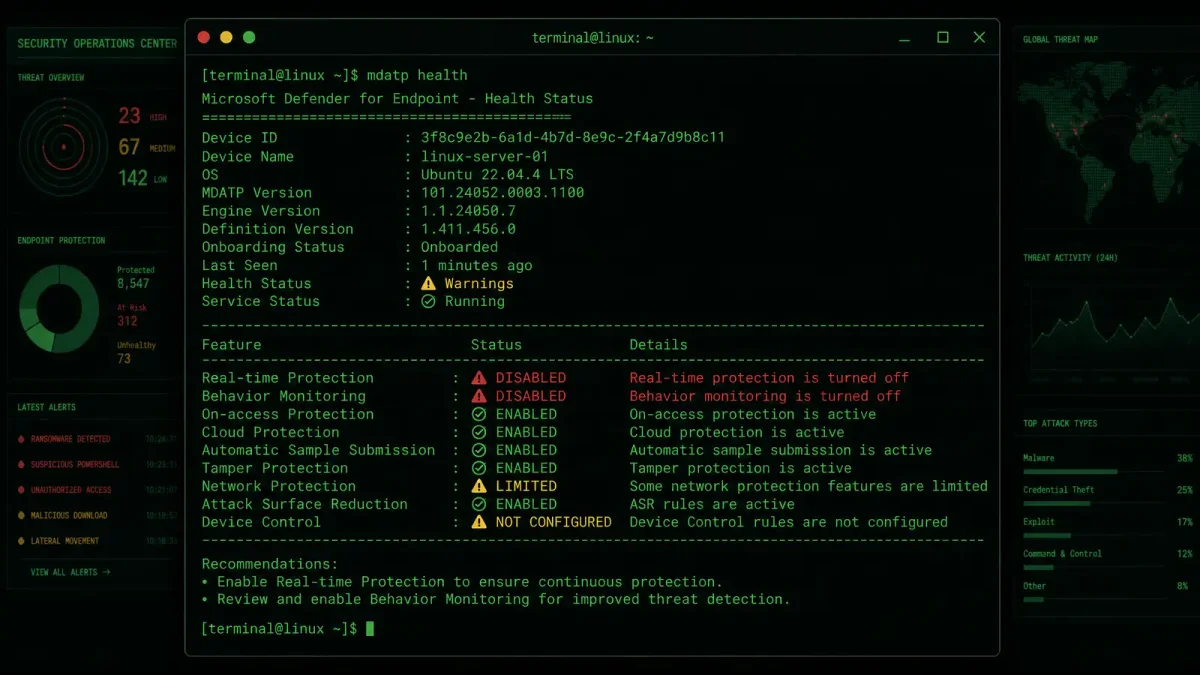
The fastest way to check is to run the built-in health command on each Linux endpoint:
sudo mdatp healthLook for the platform version in the output. If it is lower than 101.26042.0011 and the server has been rebooted since the last Defender update, the agent is likely in a disabled state. The health command will explicitly report whether antivirus protection is active, passive, or disabled. If it says anything other than “active,” you have a problem.
For fleet-wide checking, you can cross-reference with the Microsoft Defender portal. Go to Reports > Device Health and filter by platform (Linux). Look for endpoints reporting an “inactive” or “disabled” antivirus state despite showing as online. The portal’s health status updates are not always real-time, but discrepancies between “online” and “antivirus inactive” are the signal you are looking for. [1]
If you use an infrastructure-as-code approach or a configuration management tool like Ansible, Puppet, or Salt, add a post-patch validation step that runs mdatp health --query antivirus_enabled and fails the patch run if the output is not true. This catches the issue during the patch window rather than days or weeks later.
How to Fix It
For affected endpoints, the fix has two steps: update the agent and re-enable protection.
First, update to the fixed build:
# On RHEL/CentOS/Rocky/Alma
sudo yum update mdatp -y

# On Ubuntu/Debian
sudo apt update && sudo apt install --only-upgrade mdatp -y
Second, verify the update took and re-enable protection:
sudo mdatp health | grep -E "platform_version|antivirus_enabled"If antivirus is still reported as disabled after the update, force a re-enable:
sudo mdatp config real-time-protection --value enabled
sudo systemctl restart mdatp
Then verify again with mdatp health. The output should now show antivirus_enabled: true with platform version 101.26042.0011 or higher. [1]
Prioritization: Which Servers to Check First
If you have hundreds or thousands of Linux endpoints and cannot check them all at once, prioritize in this order:
Internet-facing servers. Web servers, load balancers, VPN gateways, and any Linux host with a public IP address are the highest risk. These are the machines an attacker is most likely to probe, and a disabled endpoint agent is an open door.
High-value internal servers. Database servers, authentication servers (LDAP, RADIUS, Kerberos), CI/CD runners with access to deployment secrets, and any host that stores or processes customer data. If these get compromised, the blast radius extends far beyond the compromised host.
Servers that reboot frequently. Spot instances in auto-scaling groups, CI/CD ephemeral runners, and development environments that get rebooted as part of regular maintenance. Each reboot is a chance for the bug to trigger, so these servers have the highest probability of being in a disabled state right now.
Everything else. Work through the rest of the fleet during your next maintenance window. Do not wait for the next patch cycle. The Defender agent being silently disabled is not a theoretical risk — it is a confirmed bug with an active fix, and every hour your servers run without protection is an hour an attacker could be exploiting other vulnerabilities that Defender would have caught.
Preventing This in the Future
Microsoft Defender for Endpoint on Linux has had a rocky history. The agent was initially released in 2020 to a lukewarm reception, plagued by performance issues and kernel compatibility problems. Early adopters reported CPU spikes during file scans that made production databases unresponsive, and the agent’s kernel module frequently clashed with custom kernels, requiring tedious recompilation after every kernel update. It has improved substantially since then, but incidents like this one — where an update introduces a silent failure mode that goes undetected by monitoring — erode the trust that took years to build.
The operational lesson is not to stop using Defender on Linux. It is to stop assuming that any endpoint agent’s health status is reliable without active verification.
Building Automated Health Checks
The most reliable defense against silent agent failures is an automated health check that runs on a schedule and alerts on any deviation from the expected state. Here is a minimal shell script you can drop into a cron job that runs every hour:
#!/bin/bash
# /usr/local/bin/check_mdatp.sh
STATUS=$(mdatp health --query antivirus_enabled 2>/dev/null)
if [ "$STATUS" != "true" ]; then
    logger -t mdatp-check "CRITICAL: Microsoft Defender antivirus is not enabled on $(hostname)"
    # Optional: send to your alerting system
    # curl -X POST https://alerts.example.com/webhook -d "host=$(hostname)&issue=mdatp_disabled"
fi
Schedule it with cron:
# /etc/cron.d/mdatp-health
0 * * * * root /usr/local/bin/check_mdatp.sh
For teams using Prometheus and Grafana, you can expose the antivirus status as a metric using the textfile collector. Create a script that writes to /var/lib/prometheus/node-exporter/mdatp.prom:
#!/bin/bash
# /usr/local/bin/mdatp_metrics.sh
ENABLED=$(mdatp health --query antivirus_enabled 2>/dev/null)
VERSION=$(mdatp health --query platform_version 2>/dev/null)
cat > /var/lib/prometheus/node-exporter/mdatp.prom <<EOF
mdatp_antivirus_enabled $( [ "$ENABLED" = "true" ] && echo 1 || echo 0 )
mdatp_platform_version_info{version="$VERSION"} 1
EOF
Run this script via cron before the node exporter collects metrics. Then create a Grafana alert rule: if mdatp_antivirus_enabled == 0 for more than 5 minutes on any host, page the on-call engineer.
What Your Monitoring Should Catch
Most teams monitor the process (mdatp running? yes → green), which is how this bug slipped through. Here is what you should actually be monitoring for any endpoint security agent on Linux:
-
Functional status, not process status. The agent binary being alive does not mean the protection engine is active. Query the agent’s own health endpoint or use its CLI health commands. Never rely on
systemctl is-activealone. -
Definition age. If the agent has not downloaded new threat definitions in 24 hours, something is wrong. This catches failures where the agent is running but its update mechanism is broken, which is a common precursor to silent failures.
-
Configuration drift. Track whether the agent’s configuration matches your baseline. An agent that silently resets to defaults after an update is a recurring pattern in endpoint protection software across vendors, not just Microsoft.
-
Reboot correlation. Any time a security agent’s health status changes within one hour of a system reboot, flag it for human review. Reboots are the most common trigger for agent misconfiguration bugs.
Add mdatp health checks to your post-patch validation scripts. Set up alerting for any endpoint that reports antivirus status as anything other than “active” for more than one health check cycle. And never trust a process monitor to tell you whether security software is actually working. A running process and a functioning security agent are not the same thing, and this bug is proof that the gap between them can be weeks wide.
Quick Reference: Key Commands
Keep this list handy. Every command below should return a clean, expected result on a healthy Defender for Linux installation.
| Command | What It Checks | Healthy Output |
|---|---|---|
mdatp health | Overall agent health summary | All subsystems show active/enabled |
mdatp health --query antivirus_enabled | AV engine status | true |
mdatp health --query platform_version | Agent build version | 101.26042.0011 or higher |
mdatp health --query edr_enabled | EDR sensor status | true |
mdatp health --query definitions_updated | Definition freshness | Date within last 24 hours |
mdatp config real-time-protection --value enabled | Force enable RTP | No errors |
systemctl status mdatp | Service state | active (running) |
Warning: A clean systemctl status mdatp output does not mean the agent is protecting your server. It only means the daemon process is alive. The commands in the first six rows are the ones that actually tell you whether Defender is working. Use them. If you take away one thing from this article, make it this: after every patch cycle, after every reboot, run mdatp health --query antivirus_enabled on every Linux endpoint and page on anything that is not true. The five seconds that command takes to run is cheaper than the incident it prevents.
Sources:
- Baran, G. (2026, July 27). “Microsoft Defender for Endpoint Update Leaves Few Linux Servers Unprotected After Reboot.” Cyber Security News. https://cybersecuritynews.com/defender-for-endpoint-update-linux